Imagine leaving your house unlocked with all your valuables inside. That is exactly what skipping a Microsoft 365 security audit feels like.
Recently, my manager asked me to perform a Microsoft 365 Security Audit across multiple managed services customers and find practical ways to improve tenant security. While working through those assessments, I noticed a common pattern: most environments were not insecure because of highly advanced threats, but because of simple issues that had never been reviewed properly — things like incomplete MFA rollout, too many admin accounts, risky sharing settings, and missing visibility into security activity.
As I researched the best approach, I realized Microsoft already provides several powerful tools to help security teams measure risk, identify gaps, and prioritize improvements. One of the most useful starting points I found was Security Initiatives in Microsoft Defender, which makes it much easier to track progress against frameworks such as Zero Trust, CIS Microsoft 365 Benchmark, Identity Security, and Endpoint Security. That experience helped me build a more practical and repeatable way to audit Microsoft 365 tenants, beyond just checking random settings.
In this guide, I’ve explained:
- what a Microsoft 365 security audit is
- where to start
- the key areas you should review
- the tools and scripts that can help
- best practices that make your tenant more secure over time
Whether you are a Microsoft 365 administrator, consultant, or security engineer, this guide will help you perform a structured audit and strengthen your Microsoft 365 environment.
What is a Microsoft 365 Security Audit?
A Microsoft 365 Security Audit is the process of reviewing your Microsoft 365 environment to make sure it’s secure and following best practices. It helps you find security gaps, incorrect settings, and potential risks before they become serious problems. During the audit, you’ll check important areas like user and admin permissions, email security, data sharing, device protection, and audit logs. Think of it as a regular health check for your Microsoft 365 tenant to keep your organization safe from cyber threats.
Why Microsoft 365 Security Audits Are Important
As more organizations move to the cloud, keeping your Microsoft 365 environment secure has become more important than ever. Regular Microsoft 365 Security Audits help you find security gaps before attackers can take advantage of them. They also help you stay compliant with industry standards, reduce the risk of downtime caused by security incidents, and give you better visibility into your environment. By reviewing user access, administrator permissions, and security settings, you can identify unnecessary privileges, misconfigurations, and other risks before they impact your organization.
When Should You Perform a Microsoft 365 Security Audit?
Although continuous monitoring is the ideal long-term approach, a full Microsoft 365 security audit should still be performed on a regular schedule.
A good rule of thumb is to audit:
- Quarterly if you support high-risk or regulated environments
- After major changes such as migrations, acquisitions, onboarding large groups of users, or introducing new security controls
- After a security incident such as suspicious sign-ins, phishing attacks, or data exposure
- Before compliance reviews if your organization aligns with standards such as ISO 27001, HIPAA, or GDPR
The more dynamic your environment is, the more valuable regular audits become.
Where to Start Your Microsoft 365 Security Audit
Where to Start Your Microsoft 365 Security Audit
One of the biggest mistakes people make is trying to audit a Microsoft 365 tenant manually from scratch without knowing where to focus first.
The best place to start is with Microsoft Defender Security Initiatives and Zero Trust Assessment.
Microsoft Defender Security Initiatives
Security Initiatives in Microsoft Defender help you assess security posture against specific frameworks or risk categories. Instead of reviewing hundreds of isolated recommendations one by one, Microsoft groups related controls into initiatives such as:
- Zero Trust
- CIS Microsoft 365 Benchmark
- Identity Security
- Endpoint Security
- Business Email Compromise
This makes it easier to understand what matters most and where your environment needs immediate attention. In real life, this saves a lot of time compared to manually reviewing every individual recommendation.
Zero Trust Assessment
The Zero Trust Assessment is another excellent starting point. It gives you a practical view of how your tenant aligns with Microsoft’s Zero Trust model and highlights areas that need improvement across identity, devices, applications, and data.
Secure Score vs Security Initiatives
A simple way to think about these tools is:
- Secure Score shows your overall security improvement progress
- Security Initiatives help you focus on specific frameworks and risk areas
The best approach is to use both together. Start with initiative-based review to identify gaps, then use your Secure Score to track progress over time.
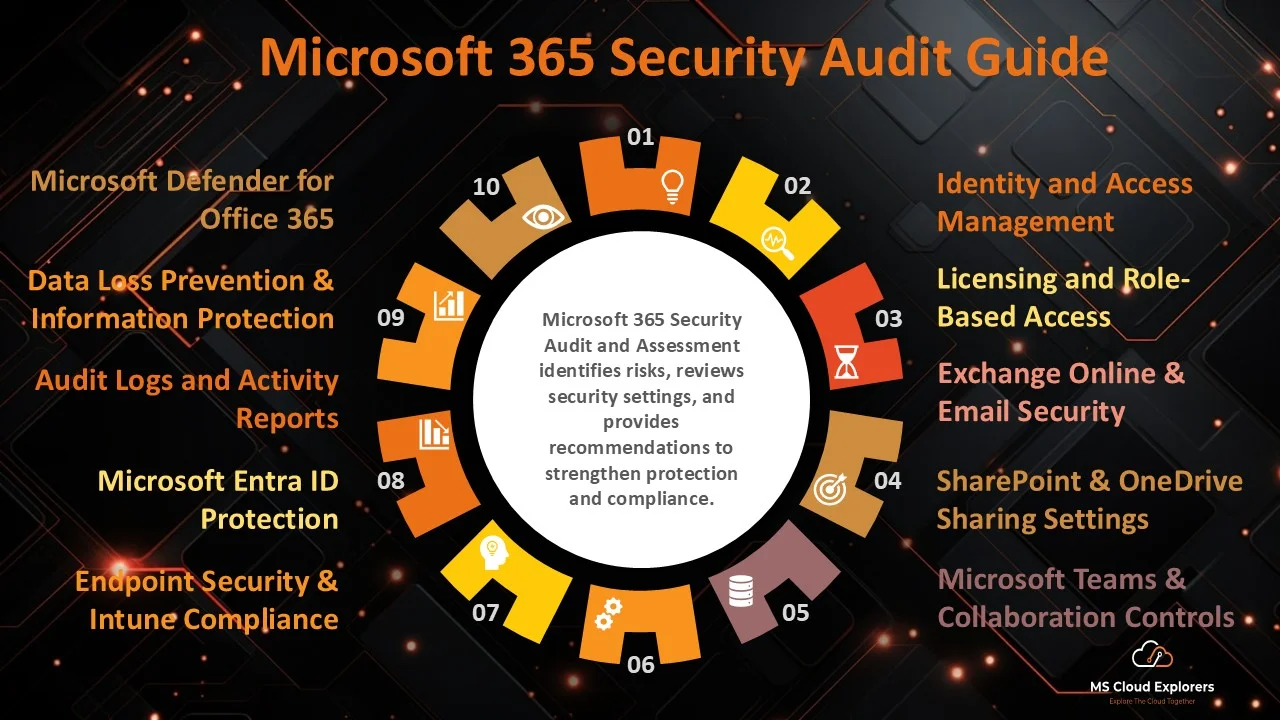
10 Essential Microsoft 365 Security Audit Checks
Every Microsoft 365 tenant should be reviewed regularly to ensure it follows security best practices. Below are the 10 essential security checks that every organization should perform to identify risks, strengthen security, and maintain a healthy Microsoft 365 environment.
1. Identity and Access Management
Identity is the foundation of Microsoft 365 security, so this should always be one of the first areas you review.
Check whether:
- Multi-Factor Authentication (MFA) is enforced for all users and admins
- Conditional Access policies are configured properly
- guest accounts are reviewed regularly
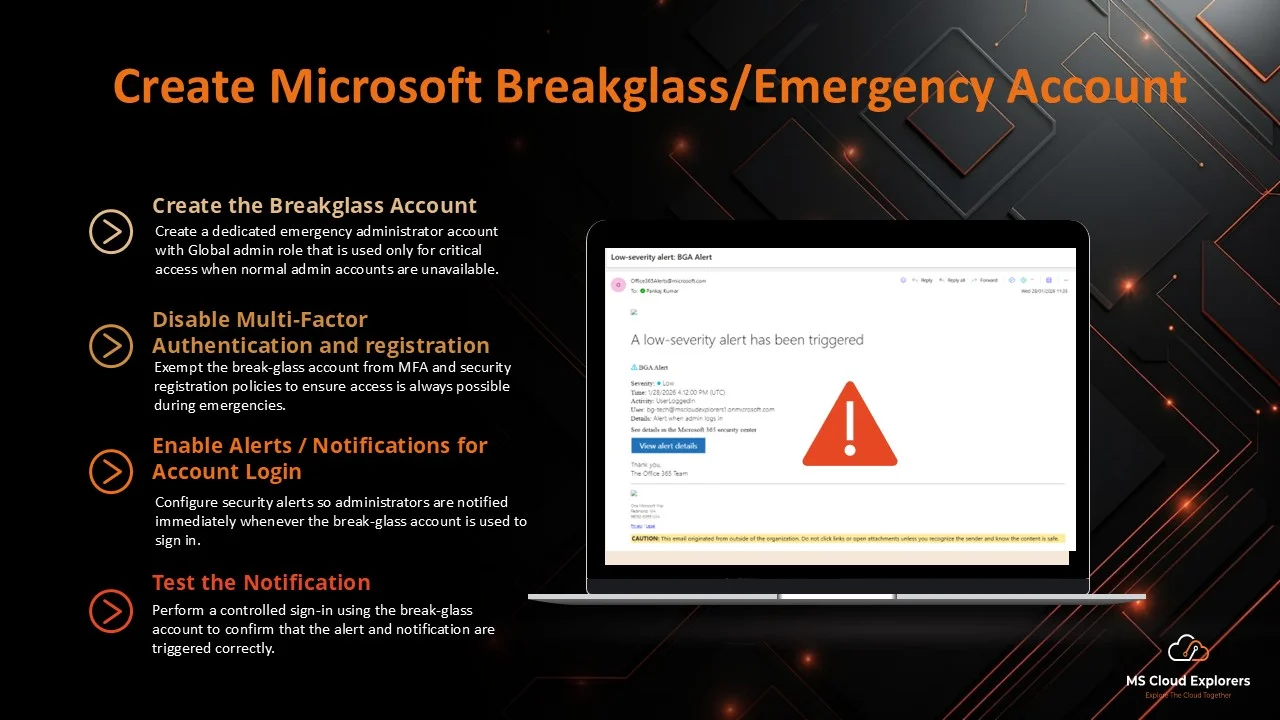
- break-glass accounts exist and are monitored
- unused accounts are disabled or removed
This matters because identity-based attacks are still one of the most common ways attackers gain access. Even one account without strong access controls can create unnecessary exposure.
🔗 Read the complete guide on Microsoft Entra ID Protection.
2. Licensing and Role-Based Access
Licensing and role assignments are often overlooked, but they are important for both security and cost control.
Review whether:
- licenses are assigned only to active users
- privileged roles such as Global Admin are limited
- inactive users still hold elevated permissions
- role-based access is being used instead of permanent broad admin rights
Why this matters: excessive privileges increase your attack surface. If a privileged account is compromised, the impact can affect the whole tenant.
Best practice: keep Global Admin accounts to a minimum — ideally fewer than three — and use least privilege wherever possible.
Tip: Run PowerShell reports to analyze license usage and access roles. Review the License with the PowerShell script
3. Exchange Online & Email Security
Email is one of the most targeted services in any Microsoft 365 environment.
Review:
- anti-phishing policies
- anti-spam and anti-malware protection
- SPF, DKIM, and DMARC configuration
- mail flow rules and auditing
- mailbox forwarding settings
Email misconfigurations can lead to phishing success, spoofing, malware delivery, and data leakage. A strong audit should confirm that these protections are not only enabled, but also aligned with your business needs.
4. SharePoint & OneDrive Sharing Settings
Data sharing is another high-risk area, especially in environments with frequent external collaboration.
Check:
- whether external sharing is restricted appropriately
- whether anonymous links are still being used
- whether sensitivity labels are applied to confidential data
- whether data sharing aligns with company policy
Excessive sharing permissions can expose business data to people who should not have access. While seeming secure on the surface, many tenants allow unsafe file sharing via outdated links or legacy settings.
5. Microsoft Teams & Collaboration Controls
Teams is central to modern collaboration, but it can also introduce security issues if left open by default.
Review:
- guest and external access settings
- file sharing controls
- app permissions and third-party integrations
- Teams policies related to communication and collaboration
Why this matters: unrestricted collaboration can lead to accidental oversharing, compliance issues, and weak visibility into where sensitive information is going.
A good practice is to align Teams settings with the same data protection and sharing standards used across SharePoint and OneDrive.
6. Microsoft Defender for Office 365
If you use Microsoft Defender for Office 365, make sure important protections are properly configured.
Review whether:
- Safe Links is enabled
- Safe Attachments is enabled
- threat alerts are configured
- users are protected against impersonation and malicious content
This is especially important in environments where phishing remains one of the biggest threats. Defender can significantly improve protection, but only if the recommended features are enabled and tuned correctly.
🔗 Check out our guide on Microsoft Defender for Office 365.
7. Data Loss Prevention & Information Protection
A secure Microsoft 365 tenant is not only about stopping attackers — it is also about preventing sensitive data from being exposed internally or externally.
Check whether:
- DLP policies exist for regulated or sensitive data
- sensitivity labels are in use
- users understand data classification requirements
- monitored content types align with business data risks
For many organizations, DLP becomes one of the most valuable controls once collaboration and cloud storage expand.
🔗 Learn how to set up DLP policies.
8. Audit Logs and Activity Reports
Audit logs are critical during investigations and ongoing monitoring.
Review whether:
- Unified Audit Log is enabled
- log retention is sufficient
- alerts exist for suspicious activity
- admin and user actions are being monitored properly
Pay special attention to events such as:
- mass deletions
- permission changes
- mailbox access anomalies
- unusual sign-in patterns
Without proper audit logging, it becomes much harder to understand what happened during a security event. Good visibility is one of the most important outcomes of any audit.
9. Microsoft Entra ID Protection
Entra ID Protection gives useful identity risk insight and can help automate responses to suspicious sign-in activity.
Check whether:
- user risk policies are configured
- sign-in risk is being monitored
- high-risk users are blocked or forced to reset passwords
- risky sign-ins trigger appropriate responses
This area is particularly useful for reducing the impact of compromised credentials and unusual identity behavior.
🔗 Complete guide on Microsoft Entra ID Overview
10. Endpoint Security & Intune Compliance
If your organization manages devices through Intune, endpoint controls should absolutely be included in the audit.
Review:
- whether all corporate devices are enrolled
- device compliance policies
- app protection policies for Outlook, Teams, and OneDrive
- Conditional Access policies tied to compliant devices
A strong identity posture is important, but security becomes much stronger when access decisions also consider device state and compliance.
🔗 Explore our full guide on Microsoft Intune Compliance.
Review Microsoft Defender Initiatives
Microsoft Defender Initiatives help you assess your security posture based on specific security frameworks and threat scenarios. Instead of reviewing hundreds of individual recommendations, you can focus on initiatives such as Business Email Compromise (BEC), CIS Microsoft 365 Foundations Benchmark, and Zero Trust. Each initiative groups related security recommendations into one place, making it easier to identify gaps, prioritize improvements, and strengthen the areas that are most important to your organization.
How to Review Microsoft Defender Initiatives
- Sign in to the Microsoft Defender Portal at https://security.microsoft.com.
- In the left navigation pane, expand Exposure Management and select Initiatives.
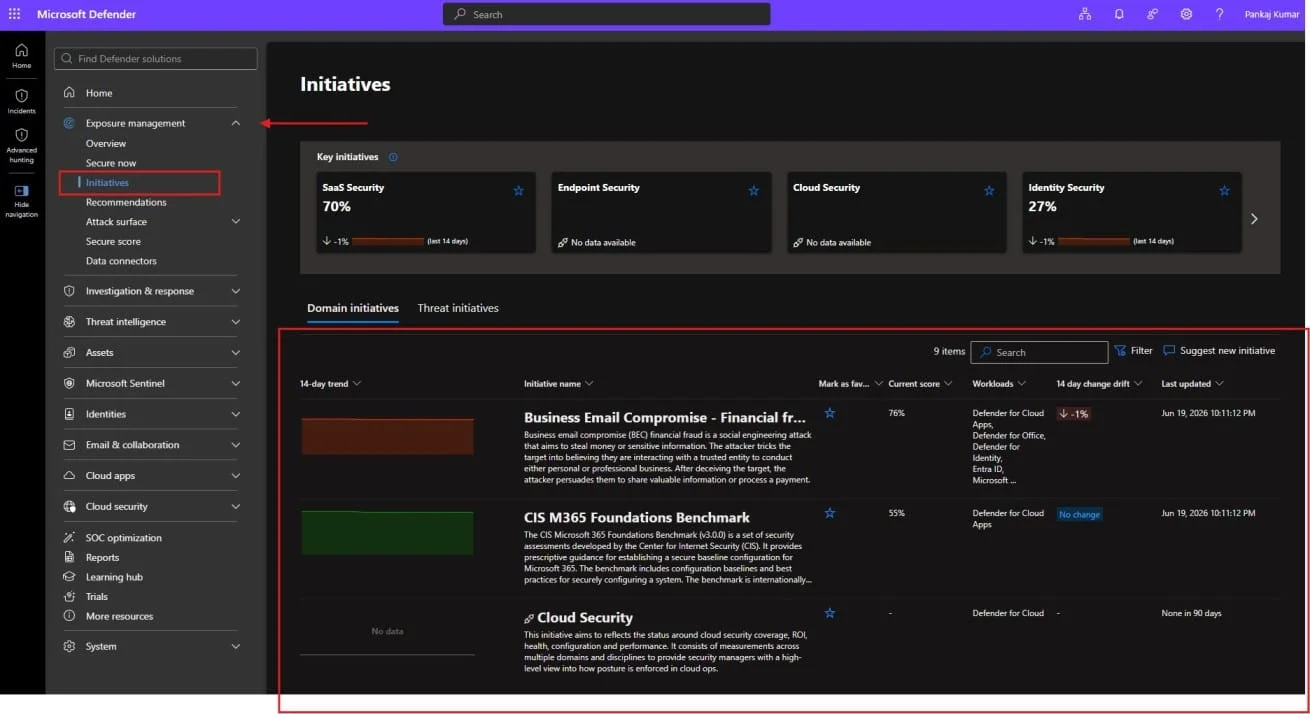
- Under Domain Initiatives, choose the initiative you want to review (for example, Business Email Compromise, CIS Benchmark, or Zero Trust).
- Click the initiative to open the details pane, then select Open initiative page.
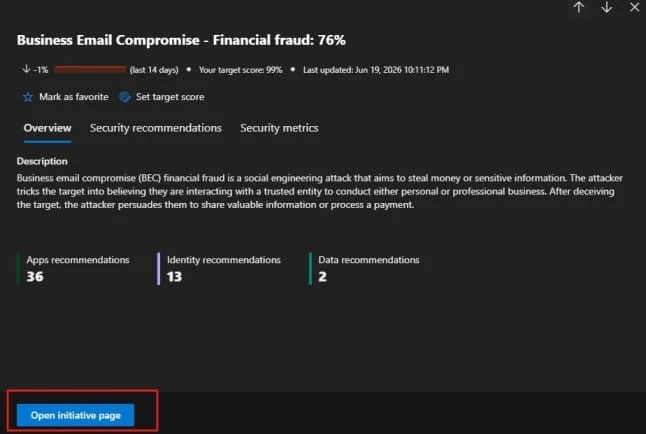 Go to the Security Recommendations tab to view all related security recommendations and remediation steps.
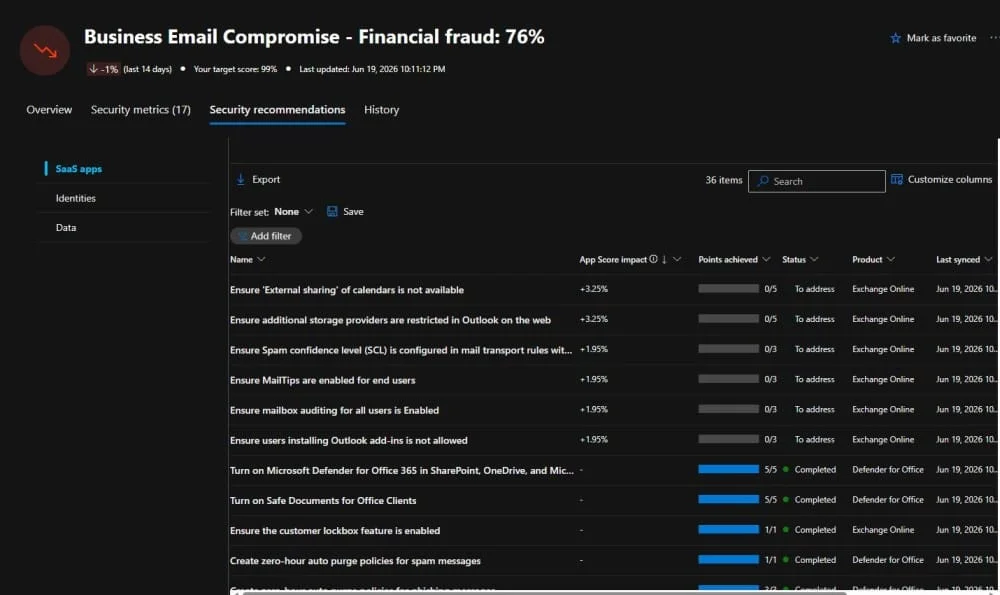
- Review and implement the recommended actions to improve your security posture.
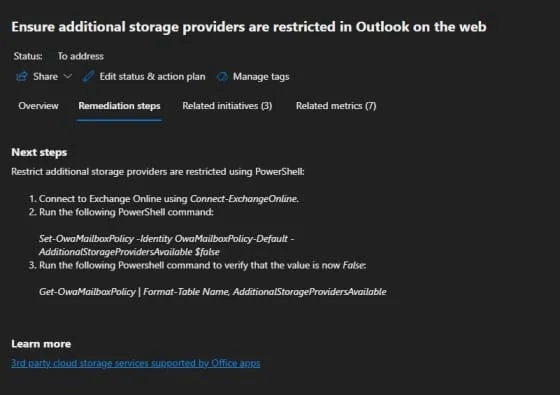
- As you complete the recommendations, your initiative score will gradually improve.
- You can also track your overall security improvements in the Microsoft Secure Score dashboard.
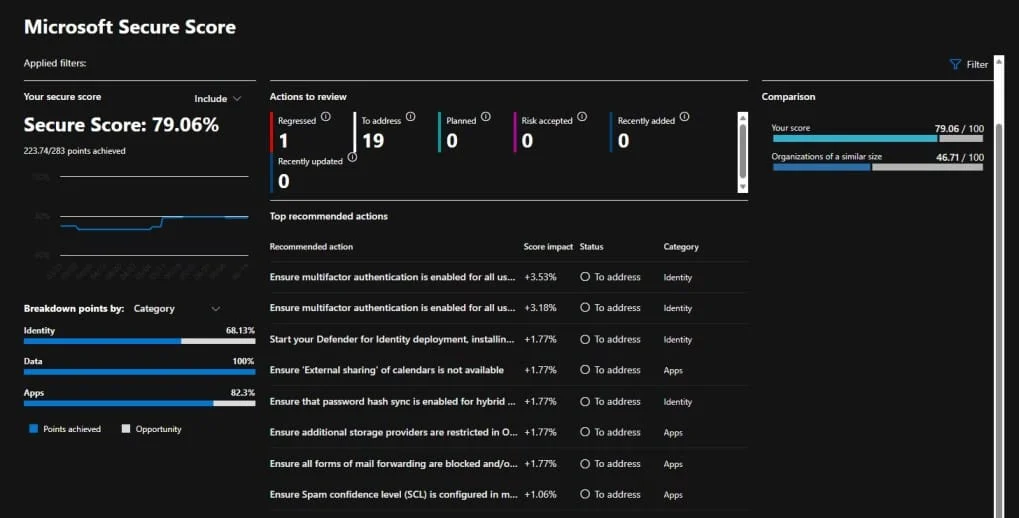
🔗 Read the complete guide on Microsoft Secure Score
Third-Party Tools
Third-Party Microsoft 365 Security Audit Tools
Tools like:
Provide:
- Advanced reporting
- Alerting
Conclusion
A Microsoft 365 security audit is no longer optional—it’s a critical step in protecting your organization’s data, identities, and cloud infrastructure.
In real-world environments, small misconfigurations—like missing MFA, excessive admin privileges, or unsecured sharing settings—are often the root cause of major security incidents. During my own audit experience across managed service customers, I observed that most risks were not due to advanced attacks, but due to simple gaps that were never reviewed.
By following a structured audit approach—starting with tools like Microsoft Defender Initiatives or Zero Trust Assessment, and then validating key areas such as identity, data protection, and endpoint security—you can significantly reduce your attack surface.
The key is consistency.
Security is not a one-time project. It’s an ongoing process that requires:
- Regular audits
- Continuous monitoring
- Timely remediation
Whether you are managing a single tenant or multiple customer environments, implementing a repeatable Microsoft 365 security audit process will help you stay ahead of threats and maintain a strong security posture.
👉 If you haven’t reviewed your Microsoft 365 environment recently, now is the right time to start.
FAQs
1. How often should I audit my Microsoft 365 tenant?
At minimum, quarterly. More frequently for high-risk industries or post-breach scenarios.
2. Is Secure Score enough for a full audit?
No. It’s a great starting point but doesn’t cover all compliance or configuration nuances.
3. Can I automate M365 audits?
Yes, with tools like Microsoft Graph API, PowerShell scripts, and third-party platforms like SysKit or AvePoint.
4. Do I need third-party tools for a successful audit?
Not necessarily. Microsoft’s built-in tools are robust, but third-party tools add depth, reporting, and automation.
5. What’s the difference between a security audit and a compliance audit?
Security audits focus on risk and technical misconfigurations, while compliance audits align practices to standards like GDPR, HIPAA, or ISO.
Related Links:-
- How to Secure Email with Microsoft Defender for Office 365 (Complete Guide)
- How to Perform a Microsoft Zero Trust Assessment Step-by-Step
- Microsoft Entra ID Protection: Identify Risky Users & Sign-ins
- Microsoft Secure Score: How to Find and Fix Security Gaps
- Microsoft Zero Trust Workshop: Complete Framework & Implementation Guide (2026)
- How to Send Encrypted Email in Outlook (Step-by-Step Guide for Secure Communication)
- Microsoft Defender for Business: Top Features to Protect Your Organization
Enjoyed the article?
We’d love to hear your thoughts—share your comments below!
For more insights, guides, and updates from the Microsoft ecosystem, be sure to subscribe to our newsletter and follow us on LinkedIn. Stay connected and never miss out on the latest tips and news!