Cybersecurity is no longer only a large enterprise problem. Small and medium businesses are now common targets because attackers know many SMBs have limited IT staff, limited security tooling, and a growing number of remote or hybrid devices. A single unmanaged laptop, outdated application, or weak endpoint protection setup can become the entry point for ransomware, credential theft, or business disruption.
The goal of Microsoft Defender for Business is to fill in that gap. It brings many enterprise-grade endpoint protection features from the Microsoft Defender ecosystem into a simplified experience for organizations with up to 300 users. If your organization already uses Microsoft 365 Business Premium, Defender for Business becomes even more valuable because it works alongside Microsoft Intune, Microsoft Entra ID, Defender for Office 365 Plan 1, and other Microsoft 365 security capabilities.
This complete guide explains what Microsoft Defender for Business is, how it works, what features are included, how pricing and licensing work, how to onboard devices, how server protection works, and how it compares with Microsoft Defender for Endpoint Plan 1 and Plan 2. The goal is to help business owners, Microsoft 365 administrators, and IT consultants decide whether Defender for Business is the right endpoint protection solution for their environment.What Makes Microsoft Defender for Business Unique?
Unlike other Defender products that are geared towards enterprise IT teams, Microsoft Defender for Business is specifically designed for SMBs. It combines advanced threat protection, simplified management, and affordable pricing in a single package.
Defender for Business offers strong security without being very complicated, whereas Windows Defender Antivirus safeguards individual PCs and Microsoft Defender for Endpoint serves large companies.
What Is Microsoft Defender for Business?
Microsoft Defender for Business is an endpoint security solution built for small and medium-sized businesses. It is based on Microsoft Defender for Endpoint technology, but Microsoft has optimized the experience for SMB environments that may not have a dedicated security operations team.
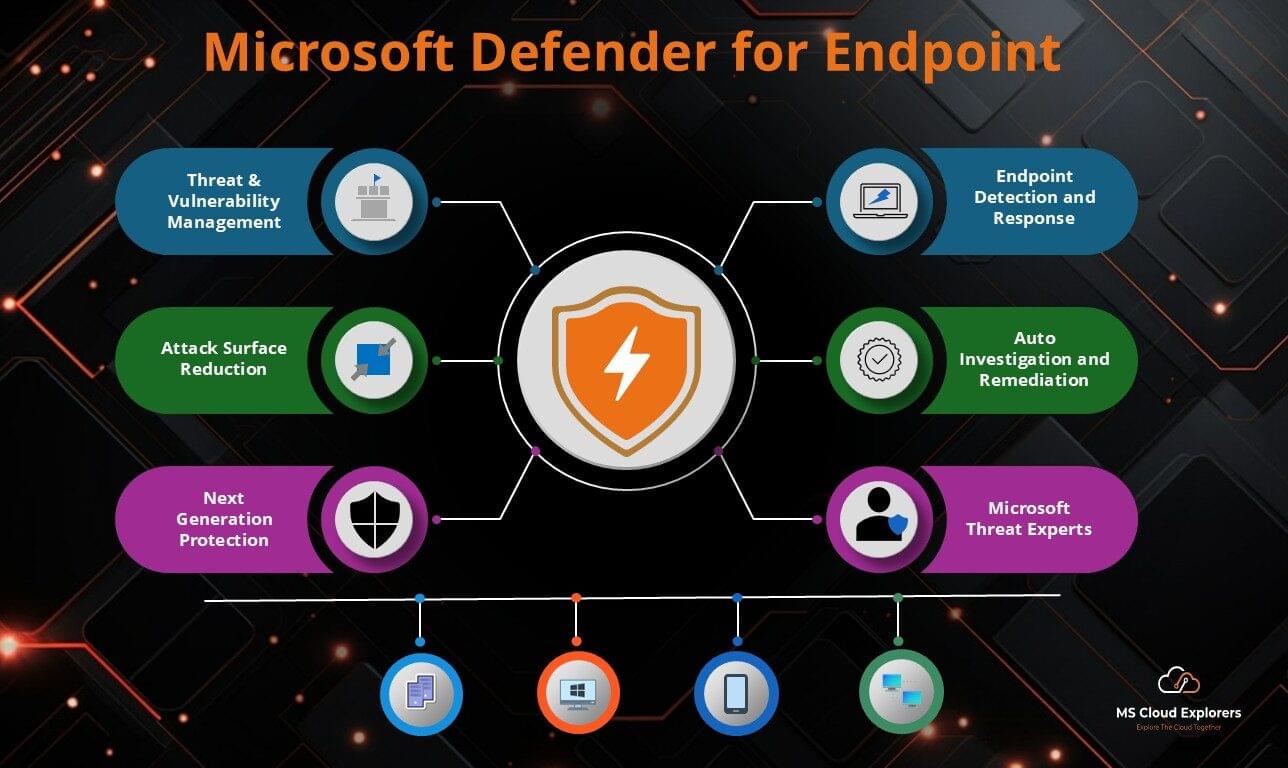
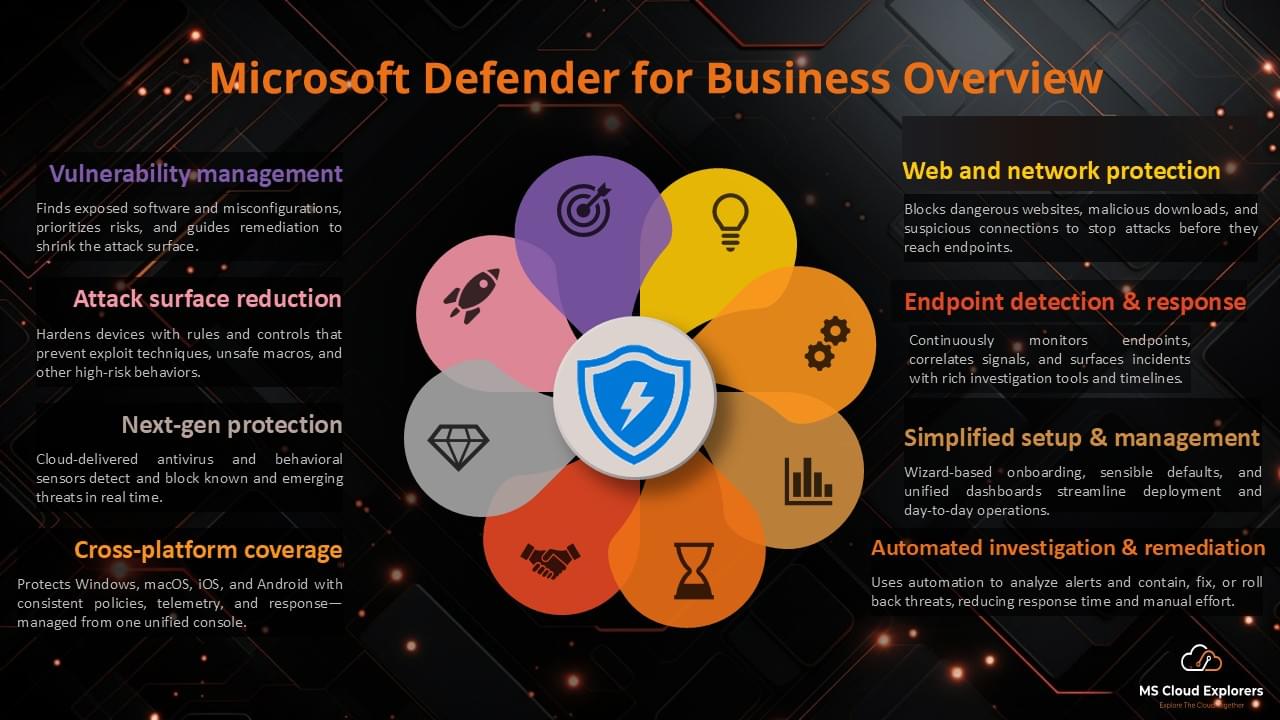
In simple terms, Defender for Business protects business devices. It goes beyond traditional antivirus by combining next-generation protection, endpoint detection and response, attack surface reduction, automated investigation and remediation, security dashboards, and core vulnerability management capabilities.
Defender for Business is especially useful for organizations that want enterprise-grade endpoint protection without the full complexity of an enterprise security operations platform. It can be deployed through the Microsoft Defender portal, Microsoft Intune, Group Policy, or onboarding scripts depending on the device type and management model.
|
Area |
What Defender for Business Provides |
|
Endpoint protection |
Antivirus, antimalware, ransomware protection, web protection, and cloud-delivered protection. |
|
EDR |
Optimized endpoint detection and response to detect, investigate, and respond to suspicious endpoint activity. |
|
Vulnerability management |
Core capabilities to discover weaknesses, prioritize risk, and guide remediation. |
|
Automation |
Automated investigation and remediation to reduce alert noise and help resolve common threats. |
|
Management |
Simplified portal experience with default security policies and Microsoft Intune integration. |
|
Best fit |
Small and medium businesses with up to 300 users. |
Who Should Use Microsoft Defender for Business?
Defender for Business is a strong fit for small and medium-sized organizations that need reliable endpoint security but do not have the budget or staffing model for enterprise security operations. It is also a natural fit for Microsoft 365 Business Premium customers because Microsoft 365 Business Premium includes Defender for Business, Microsoft Intune, Microsoft Entra ID P1, and Defender for Office 365 Plan 1.
The solution is particularly useful when a business needs to protect employee laptops, desktops, mobile devices, and Mac devices from modern threats while keeping administration manageable for a small IT team or managed service provider.
|
Use Case |
Is Defender for Business a Good Fit? |
Reason |
|
Small business using Microsoft 365 Business Premium |
Yes |
Defender for Business is included with Business Premium and integrates well with Intune and Entra ID. |
|
Business with fewer than 300 users |
Yes |
The product is designed for SMBs up to 300 users. |
|
Lean IT team or no dedicated SOC |
Yes |
Simplified configuration and automation reduce administrative overhead. |
|
Enterprise requiring advanced hunting and long retention |
Consider Defender for Endpoint P2 |
Advanced hunting and deeper event retention requirements are better aligned with Defender for Endpoint P2. |
|
Organization with more than 300 users |
Consider enterprise security plans |
Defender for Business is scoped for organizations up to 300 users. |
Key Features of Microsoft Defender for Business
Next-Generation Protection
Next-generation protection helps detect and block malware, ransomware, suspicious scripts, malicious files, and other threats using Microsoft cloud protection, behavior monitoring, and machine learning. For SMBs, this is the foundation that replaces or strengthens traditional antivirus protection.
Endpoint Detection and Response
Endpoint detection and response, also known as EDR, gives administrators visibility into suspicious endpoint behavior. Instead of only blocking known malware, EDR helps identify attack patterns, related alerts, affected devices, and response actions.
Threat and Vulnerability Management
Threat and vulnerability management helps identify weaknesses such as missing updates, vulnerable applications, misconfigurations, and other risks that attackers may exploit. This is valuable because prevention is usually cheaper and safer than incident response.
Attack Surface Reduction
Attack surface reduction helps reduce the ways attackers can compromise devices. Examples include controlling risky scripts, blocking abuse of Office applications, reducing ransomware behavior, enabling network protection, and hardening endpoint configuration.
Automated Investigation and Remediation
Automated investigation and remediation can investigate alerts and take remediation actions for common threats. This is especially useful for SMBs because many small IT teams cannot manually review every alert in real time.
Security Reports and Dashboards
The Microsoft Defender portal provides security dashboards, device inventory, alerts, incidents, recommendations, and reporting views. These dashboards help administrators quickly understand which devices need attention.
Microsoft Intune Integration
When Microsoft Intune is available, administrators can deploy endpoint security policies, antivirus policies, firewall policies, attack surface reduction rules, and onboarding configurations using modern cloud-based device management.
Cloud Integration Capabilities
Defender for Business integrates natively with Microsoft 365, Azure Active Directory (Entra ID), Intune, and Microsoft Defender for Cloud Apps, creating a unified security ecosystem.
Microsoft Defender for Business Pricing and Licensing
Microsoft Defender for Business is available as a standalone license and is also included in Microsoft 365 Business Premium. The standalone option is helpful for organizations using Microsoft 365 Business Basic, Microsoft 365 Business Standard, or other eligible Microsoft 365 plans that need endpoint protection without upgrading every user to Business Premium.
For many SMBs, Microsoft 365 Business Premium is the better security bundle because it includes Defender for Business along with Microsoft Intune, Microsoft Entra ID P1, Defender for Office 365 Plan 1, and additional Microsoft 365 security capabilities. This makes Business Premium a strong option when the organization needs endpoint security, email protection, identity controls, and device management in one package.
Microsoft currently lists Microsoft Defender for Business standalone pricing at $3.00 user/month when paid yearly, but pricing can vary by region, currency, billing term, partner channel, and Microsoft updates. Always validate pricing in the Microsoft 365 admin center, Microsoft product page, or with your Cloud Solution Provider before purchasing.
|
Licensing Item |
Important Detail |
|
Standalone Defender for Business |
Available separately for eligible Microsoft 365 or Office 365 organizations with up to 300 users. |
|
Microsoft 365 Business Premium |
Includes Microsoft Defender for Business as part of the Business Premium security bundle. |
|
User limit |
Designed for small and medium-sized businesses with up to 300 users. |
|
Client device limit |
Microsoft documents that up to five client devices can be onboarded and secured per licensed user. |
|
Server protection |
Requires extra server licenses. Server licensing is separate from standard user licensing. |
|
Pricing validation |
Confirm the latest price from Microsoft or your CSP before rollout. |
|
Licensing tip If the customer already owns Microsoft 365 Business Premium, do not purchase Defender for Business standalone unless there is a specific licensing reason. First confirm whether Defender for Business is already included and assigned to the users. |
Microsoft Defender for Business Servers Explained
A common question is whether Microsoft Defender for Business protects servers. The answer is yes, but server protection requires extra licensing. Client devices and servers should be planned separately because server workloads often have different operational requirements, risk levels, and licensing models.
Microsoft Defender for Business servers is available as an add-on for organizations using Defender for Business or Microsoft 365 Business Premium. It allows SMBs to protect Windows Server and Linux Server instances from the Defender portal experience. If the organization has a larger server estate, especially more than 60 servers, Microsoft recommends considering other server protection options such as Microsoft Defender for Endpoint Server or Microsoft Defender for Servers Plan 1 or Plan 2.
|
Scenario |
Recommended Direction |
|
Few Windows or Linux servers in an SMB environment |
Use Microsoft Defender for Business servers add-on if the organization is eligible. |
|
Many servers or complex server workloads |
Evaluate Microsoft Defender for Servers Plan 1 or Plan 2. |
|
Business has more than 60 servers |
Review Microsoft guidance and consider enterprise server protection options. |
|
Only user laptops and desktops |
Standard Defender for Business user licensing may be enough for client devices. |
Microsoft Defender for Business vs Defender for Endpoint P1 and P2
Many administrators confuse Microsoft Defender for Business with Microsoft Defender for Endpoint Plan 1 and Plan 2. The products are related, but the target audience and feature depth are different.
|
Capability |
Defender for Business |
Defender for Endpoint P1 |
Defender for Endpoint P2 |
|
Target audience |
SMBs up to 300 users |
Organizations needing foundational endpoint protection |
Enterprises needing advanced endpoint security |
|
Next-generation protection |
Included |
Included |
Included |
|
Attack surface reduction |
Included |
Included |
Included |
|
EDR |
Included, optimized for SMB |
Not included |
Included |
|
Automated investigation and remediation |
Included |
Not included |
Included |
|
Threat and vulnerability management |
Core capabilities |
Not included |
Included |
|
Advanced hunting |
Not the primary experience |
Not included |
Included |
|
Best fit |
Small business endpoint protection |
Basic endpoint controls |
Enterprise SOC and advanced investigations |
|
Practical recommendation Use Defender for Business when the organization is an SMB and needs strong endpoint protection without enterprise SOC complexity. When the company requires enterprise-level security operations, greater investigation capabilities, expanded event retention, and advanced hunting, use Defender for Endpoint P2. |
Does Microsoft Defender for Business Include Email Protection?
This is one of the most important points to explain clearly. Microsoft Defender for Business is primarily an endpoint security solution. It protects devices. It is not the same product as Microsoft Defender for Office 365, which protects email and collaboration workloads such as Exchange Online, SharePoint, OneDrive, and Microsoft Teams.
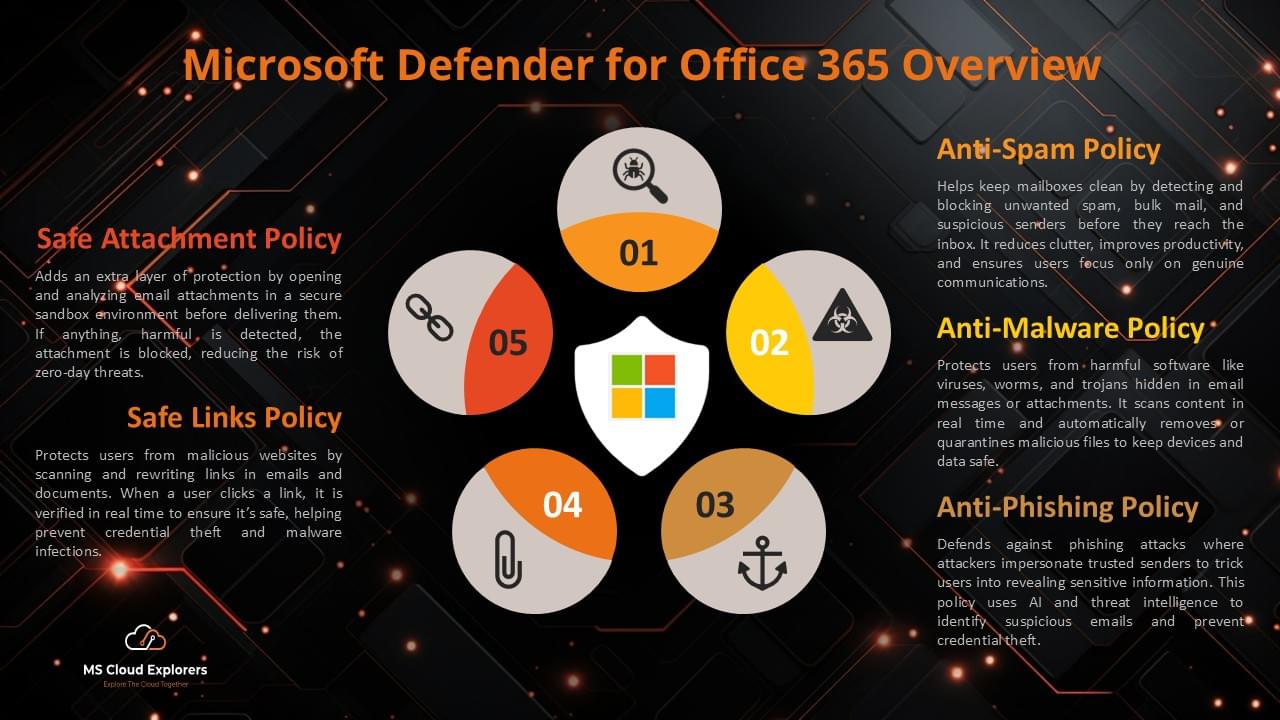
However, Microsoft 365 Business Premium includes both Defender for Business and Defender for Office 365 Plan 1. That means Business Premium customers can get endpoint protection and email protection in the same Microsoft 365 bundle, but the capabilities come from different Defender products.
For example, Safe Links, Safe Attachments, anti-phishing protection, and email threat policies are part of Defender for Office 365, not the standalone Defender for Business endpoint license. If your blog already has a Defender for Office 365 configuration guide, this is a strong place to add an internal link.
|
Protection Area |
Product Responsible |
|
Windows, macOS, iOS, and Android device protection |
Microsoft Defender for Business |
|
Endpoint detection and response |
Microsoft Defender for Business |
|
Threat and vulnerability management for devices |
Microsoft Defender for Business |
|
Email anti-phishing, Safe Links, and Safe Attachments |
Microsoft Defender for Office 365 Plan 1 or Plan 2 |
|
Identity protection and Conditional Access |
Microsoft Entra ID P1/P2 depending on settings |
|
Device compliance and endpoint policies |
Microsoft Intune |
How to Set Up Microsoft Defender for Business
The exact setup steps depend on licensing, device management, and whether the organization uses Microsoft Intune. The following process is a practical rollout model for most Microsoft 365 Business Premium environments.
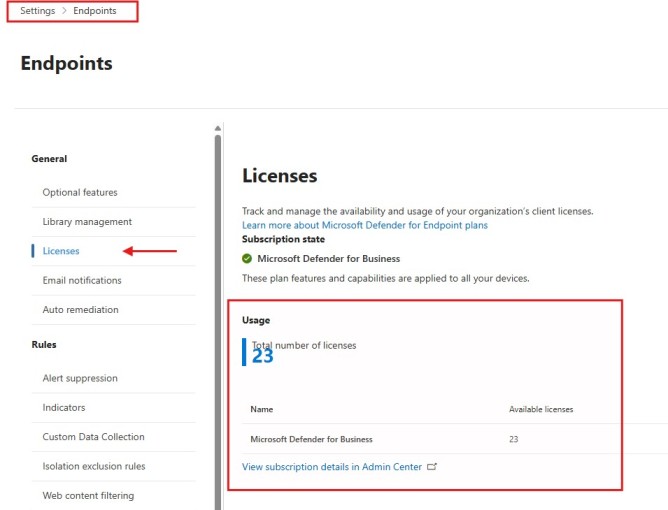
Step 1: Confirm licensing
Verify that users have Microsoft Defender for Business standalone licenses or Microsoft 365 Business Premium licenses assigned. Also confirm whether server add-on licenses are required.
Security Portal > Settings > Endpoint Licenses
Step 2: Confirm admin permissions
Use an account with appropriate administrative permissions such as Global Administrator or Security Administrator. Follow least privilege where possible.
Step 3: Open the Microsoft Defender portal
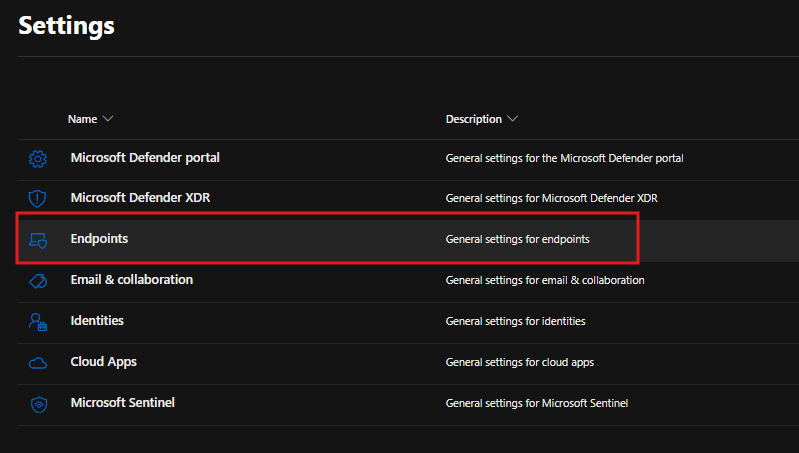
Go to security.microsoft.com and review Settings > Endpoints. If the Endpoint settings are not visible, check license assignment, role assignment, and service activation.
Step 4: Complete initial setup
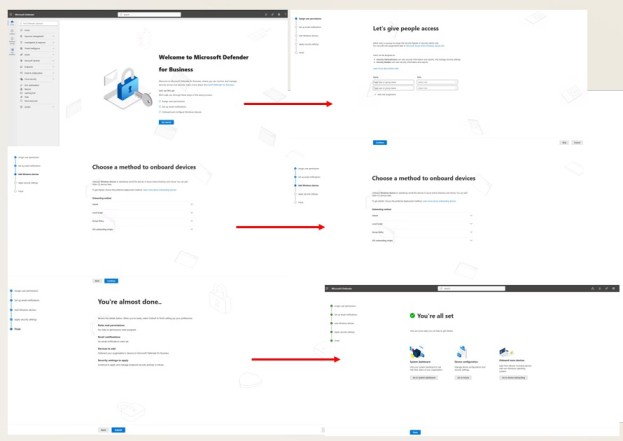
Use the guided setup experience if available. Configure security roles, email notifications, and the initial endpoint protection settings.
Step 5: Connect Microsoft Intune
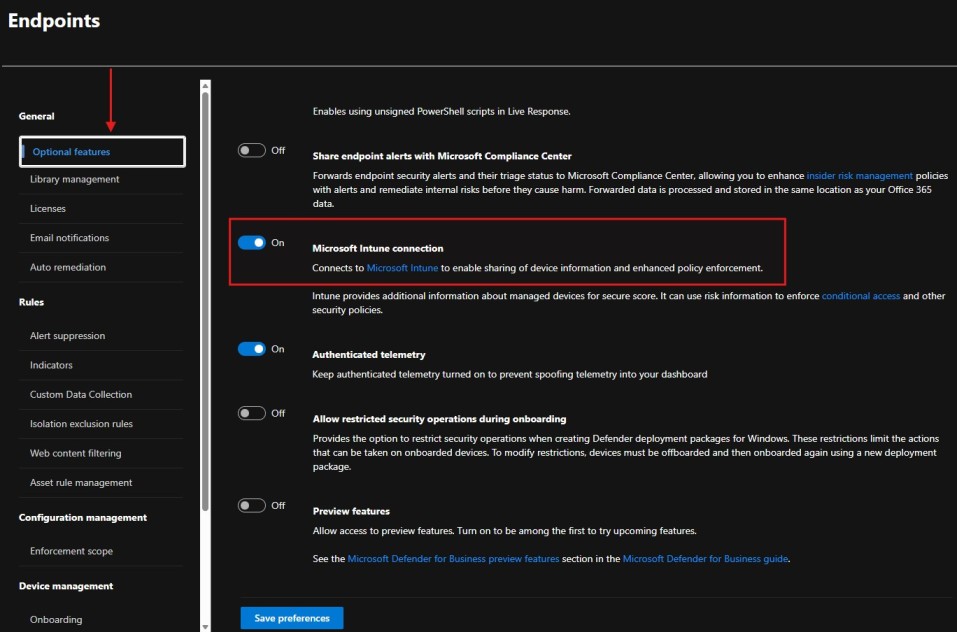
If the organization uses Intune, enable the integration so endpoint security policies and onboarding can be managed through Intune and Defender experiences.
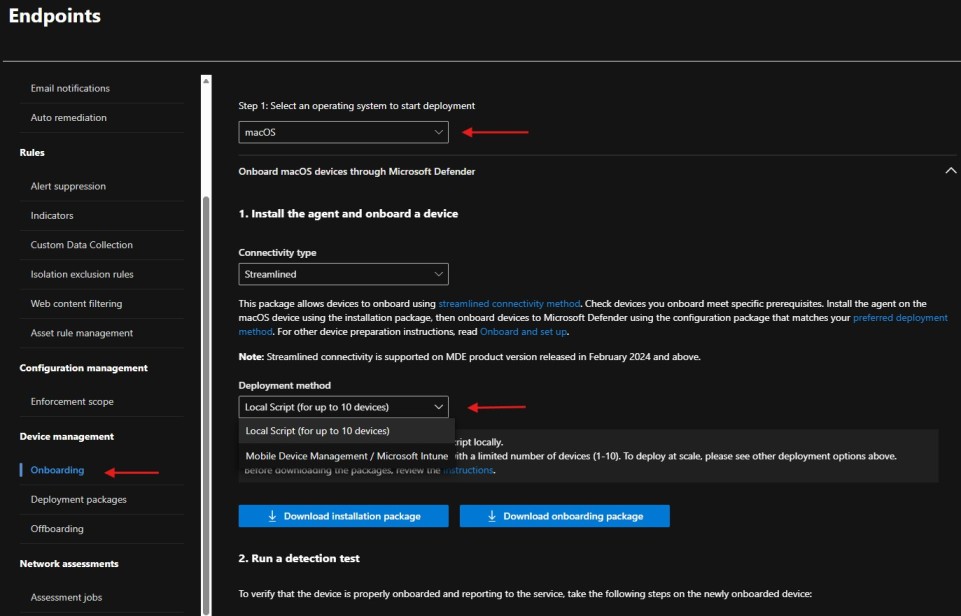
Step 6: Onboard Windows devices
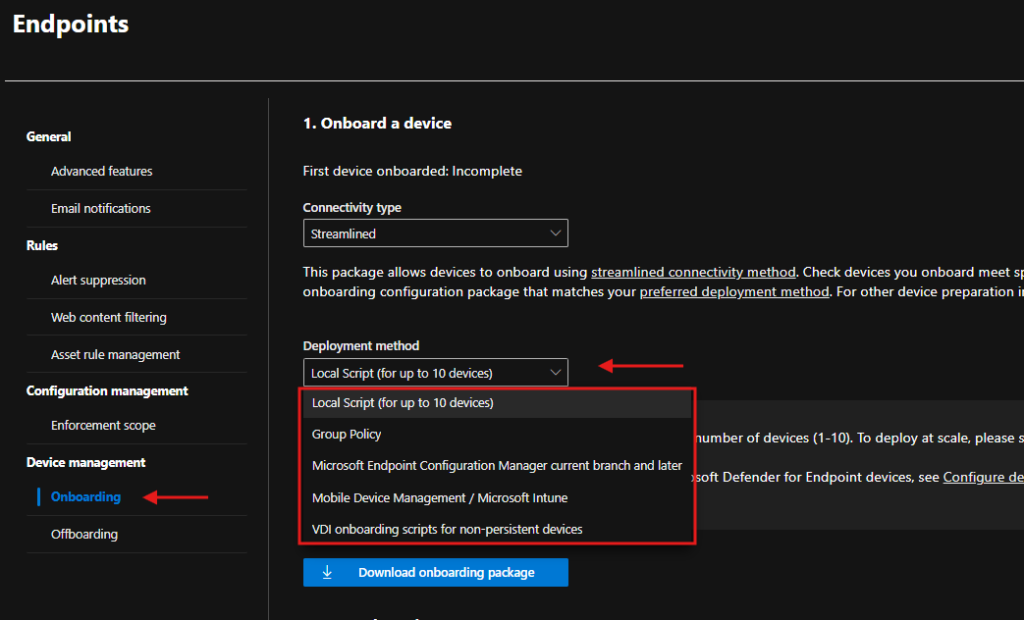
Use Intune for cloud-managed devices, Group Policy for domain-joined devices, local scripts for testing, or VDI onboarding scripts for non-persistent virtual desktop scenarios.
Step 7: Onboard macOS, iOS, and Android devices
Use the Microsoft Defender app and supported management methods such as Intune where applicable.
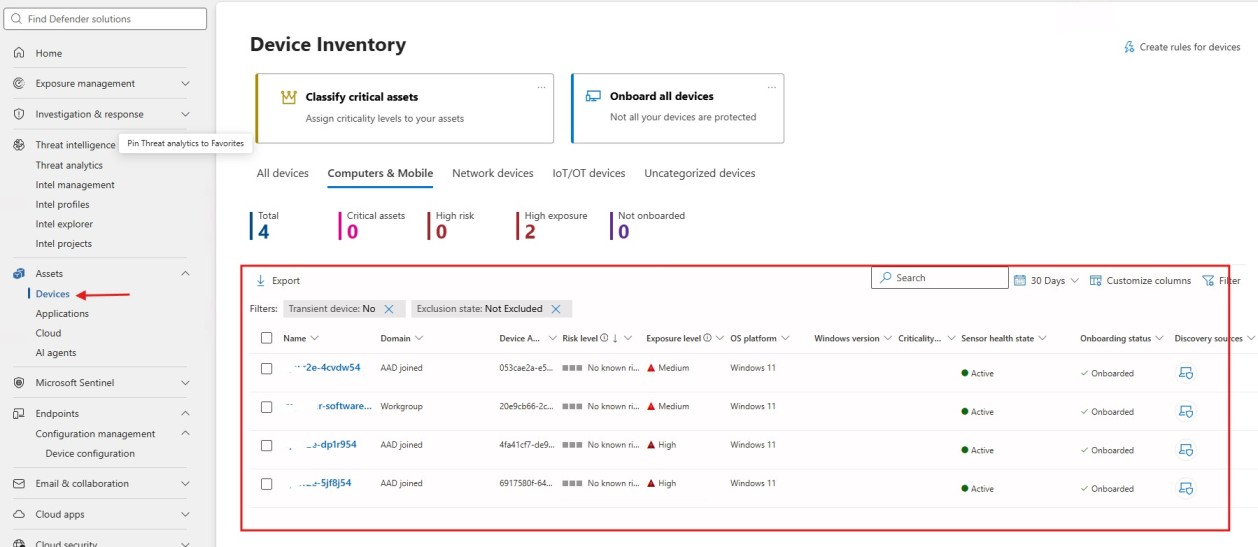
Step 8: Validate device reporting
Check device inventory in the Defender portal and confirm onboarding status, sensor health, policy application, and recent device activity.
Security Portal > Assets > Devices
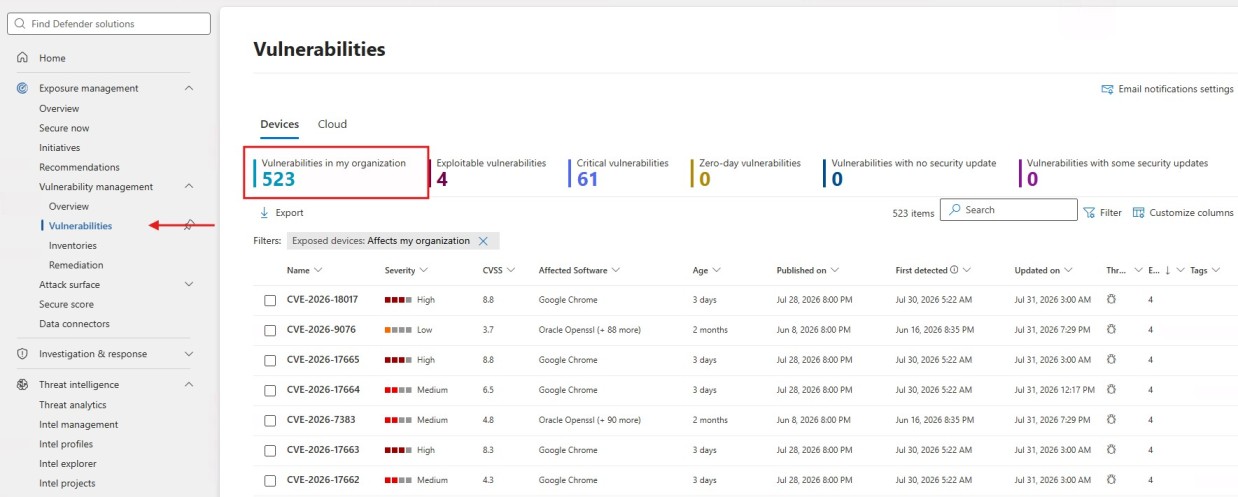
Step 9: Review recommendations
Open vulnerability management recommendations and prioritize high-risk exposures first.
Step 10: Monitor incidents and alerts
Review the incident queue, alert details, affected devices, and automated investigation results regularly
Recommended SMB Security Baseline
After onboarding devices, do not stop at default visibility. Use Defender for Business as part of a practical security baseline. The following baseline is a good starting point for many SMB environments, but every organization should test settings before broad rollout.
|
Baseline Area |
Recommended Action |
|
Antivirus and cloud protection |
Enable real-time protection, cloud-delivered protection, automatic sample submission, and protection updates. |
|
Tamper protection |
Enable tamper protection to help prevent unauthorized changes to Microsoft Defender settings. |
|
Attack surface reduction |
Start with audit mode for high-impact ASR rules, then move validated rules to block mode. |
|
Web protection |
Enable network protection and web content filtering where appropriate. |
|
Firewall |
Use Microsoft Defender Firewall policies through Intune or Defender management. |
|
Vulnerability remediation |
Review high-risk software vulnerabilities and prioritize internet-facing or widely deployed applications. |
|
Device compliance |
Use Intune compliance policies to identify risky, outdated, or non-compliant devices. |
|
Identity security |
Enable MFA and Conditional Access if available through the organization’s Microsoft 365 licensing. |
|
Alert review |
Review incidents and alerts regularly, especially high-severity alerts and devices with active recommendations. |
Common Issues and Troubleshooting
The following issues are common during SMB deployments and should be included because they match real administrator search intent.
|
Issue |
Likely Cause |
Recommended Fix |
|
Endpoint settings not visible in Defender portal |
License not assigned, role missing, or service not activated |
Confirm license assignment, admin role, and wait for provisioning. Then sign out and sign back in. |
|
Device onboarded but not appearing |
Sensor not reporting, network connectivity issue, or onboarding script not completed |
Check device connectivity, run Microsoft Defender client analyzer, and verify onboarding package. |
|
Real-time protection is off |
Third-party antivirus may be active or policy conflict exists |
Review security software, Defender AV mode, and Intune or Group Policy settings. |
|
Intune connection not working |
Connector disabled or tenant configuration incomplete |
Enable Microsoft Intune connection in Defender settings and verify Intune tenant health. |
|
Server onboarding confusion |
Server license not purchased or incorrect server protection plan selected |
Confirm Defender for Business servers add-on or evaluate Defender for Servers Plan 1/Plan 2. |
|
ASR rules not applying |
Rules not configured in Intune or assignment/filter issue |
Check Intune endpoint security policy assignment, device group membership, and policy status. |
|
Too many alerts |
Default policies may need tuning or vulnerabilities are unresolved |
Review automated investigation results, remediation recommendations, and alert suppression strategy carefully. |
Real-World Use Cases for Microsoft Defender for Business
Remote workforce protection
A small company with remote employees can onboard laptops into Defender for Business and manage antivirus, firewall, web protection, and endpoint alerts from the cloud.
Ransomware risk reduction
A business can combine next-generation protection, attack surface reduction rules, controlled access to risky behaviors, and vulnerability management to reduce ransomware exposure.
Microsoft 365 Business Premium security bundle
An SMB using Business Premium can combine Defender for Business, Defender for Office 365 Plan 1, Intune, and Entra ID P1 for stronger device, email, identity, and management protection.
Small IT team operations
A lean IT team can use automated investigation, device inventory, dashboards, and recommendations instead of manually chasing every endpoint security issue.
Pros and Cons of Microsoft Defender for Business
|
Pros |
Cons or Limitations |
|
Strong value for SMB endpoint security |
Limited to organizations up to 300 users |
|
Included with Microsoft 365 Business Premium |
Server protection requires extra licensing |
|
Includes EDR optimized for SMBs |
Not designed to replace Defender for Endpoint P2 for advanced SOC needs |
|
Works well with Microsoft Intune |
Some advanced configurations require Intune knowledge |
|
Automated investigation and remediation reduces workload |
Alert tuning and vulnerability remediation still require admin review |
|
Good Microsoft 365 ecosystem integration |
Email protection requires Defender for Office 365, not standalone Defender for Business |
Final Verdict: Is Microsoft Defender for Business Worth It in 2026?
Microsoft Defender for Business is one of the strongest endpoint security options for SMBs already invested in Microsoft 365. It provides much more than traditional antivirus by adding EDR, vulnerability management, attack surface reduction, automation, and cloud-based security dashboards into a simplified Microsoft-managed experience.
For organizations using Microsoft 365 Business Premium, it is usually a very strong choice because the endpoint protection layer works naturally with Intune, Entra ID, and Defender for Office 365 Plan 1. This combination gives small businesses a practical security foundation across devices, identity, email, and management.
However, Defender for Business is not the right fit for every organization. If the environment has more than 300 users, requires enterprise-grade threat hunting, needs advanced security operations workflows, or manages a large and complex server estate, Microsoft Defender for Endpoint Plan 2 or Microsoft Defender for Servers may be more appropriate.
For most small and medium businesses, the best approach is to start with Microsoft 365 Business Premium, validate Defender for Business deployment through Intune, configure a practical endpoint security baseline, and continuously monitor recommendations and incidents in the Microsoft Defender portal.
FAQs About Microsoft Defender for Business
What is Microsoft Defender for Business?
Microsoft Defender for Business is an endpoint security solution for small and medium businesses. It protects devices from malware, ransomware, and other endpoint threats using antivirus, EDR, attack surface reduction, vulnerability management, and automated remediation.
Does Microsoft 365 Business Premium offer Microsoft Defender for Business?
Yes. Microsoft 365 Business Premium includes Microsoft Defender for Business. This makes Business Premium a strong option for SMBs that need endpoint protection, device management, identity protection, and email security capabilities in one bundle.
How much does Microsoft Defender for Business cost?
Microsoft lists Microsoft Defender for Business standalone pricing at $3.00 per user/month when paid yearly, but pricing can vary by region, billing term, and partner channel. Always confirm current pricing before purchasing.
Does Microsoft Defender for Business include EDR?
Yes. Defender for Business includes optimized endpoint detection and response capabilities designed for SMB environments.
Does Microsoft Defender for Business protect servers?
Yes, but server protection requires extra licenses. Microsoft Defender for Business servers is available as an add-on for eligible Defender for Business and Microsoft 365 Business Premium customers.
How many devices can I onboard with Defender for Business?
Microsoft documents that you can onboard and secure up to five client devices per licensed user. Servers require separate licensing.
What is the 300-user limit?
Defender for Business is designed for organizations with up to 300 users. Organizations above that size should evaluate enterprise options such as Microsoft Defender for Endpoint or Microsoft Defender XDR licensing.
Does Microsoft Defender for Business protect email?
Defender for Business focuses on endpoint protection. Email protection is provided by Microsoft Defender for Office 365. Microsoft 365 Business Premium includes Defender for Office 365 Plan 1 along with Defender for Business.
What is the difference between Defender for Business and Defender for Endpoint P2?
Defender for Business is optimized for SMBs and includes many strong endpoint protection capabilities. Defender for Endpoint P2 is designed for enterprise environments requiring advanced hunting, deeper investigation, and broader security operations features.
Can Microsoft Defender for Business replace traditional antivirus?
Yes, for many SMB environments it can replace traditional antivirus because it includes next-generation protection and additional capabilities such as EDR, vulnerability management, and automated remediation.
How do I download Microsoft Defender for Business?
For Windows devices, Defender components are built into the operating system and devices are onboarded to the Microsoft Defender service. For macOS, iOS, and Android, organizations use the Microsoft Defender app and supported onboarding methods such as Intune.
Does Defender for Business work with Microsoft Intune?
Yes. Defender for Business integrates with Microsoft Intune so administrators can deploy endpoint security policies, onboarding profiles, antivirus settings, firewall settings, and attack surface reduction rules.
Is Microsoft Defender for Business good for small businesses?
Yes. It is designed for small and medium-sized businesses that need strong endpoint protection without enterprise-level complexity.
What happens if my organization grows beyond 300 users?
If your organization grows beyond 300 users, review Microsoft enterprise security options such as Defender for Endpoint Plan 1, Defender for Endpoint Plan 2, Microsoft 365 E3, Microsoft 365 E5, or Microsoft Defender XDR depending on requirements.
Do I still need Microsoft Intune?
Defender for Business can be used without Intune in some onboarding scenarios, but Intune provides a much better management experience for cloud-based policy deployment, compliance, and endpoint security configuration.
Explore More from MS Cloud Explorers
- Microsoft Defender for Office 365 configuration guide
- Microsoft Intune Setup Step by Step: A Complete Guide for Admins
- Microsoft Endpoint Manager (Intune): Comprehensive Beginner’s Guide
- Microsoft Entra ID MFA and Conditional Access guide
- Windows device onboarding to Microsoft Defender guide
- Microsoft Defender for Identity: Deep Dive into Modern Threat Detection and Identity Protection
- Microsoft Defender for Endpoint: Comprehensive Guide to Architecture, Features, and Plans
- Microsoft Defender for Office 365: Your Shield Against Cyber Threats
- Secure Sensitive Documents in SharePoint Online Using IRM
- Microsoft 365 Data Protection: The Ultimate Guide to Secure Your Cloud Data.
- How to Send Encrypted Email in Outlook: A Step-by-Step Guide
- Microsoft Insider Risk Management: A Complete Guide to Prevent Insider Threats
Enjoyed the article?
We’d love to hear your thoughts—share your comments below!
For more insights, guides, and updates from the Microsoft ecosystem, be sure to subscribe to our newsletter and follow us on LinkedIn. Stay connected and never miss out on the latest tips and news!