

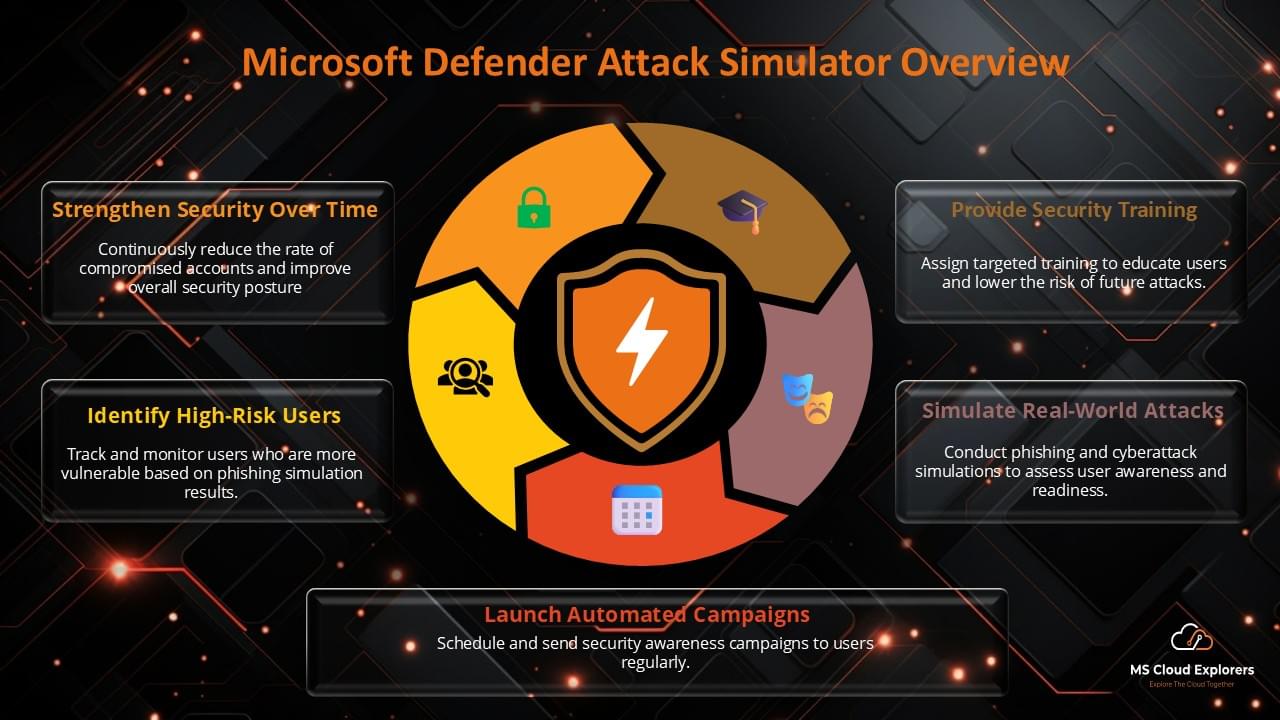
Phishing is still one of the easiest ways for attackers to get inside a business. Microsoft says it screens 5 billion emails every day for threats like malware and phishing, while Verizon’s 2025 Data Breach Investigations Report says the human element was involved in 60% of breaches. That is exactly why phishing awareness cannot be treated as a once-a-year training exercise. It has to be tested, measured, and improved continuously.
In Microsoft 365, the native way to do this is Microsoft Attack Simulation Training in Microsoft Defender for Office 365. Microsoft’s own documentation describes it as a way to run realistic but harmless attack scenarios, identify vulnerable users, and assign training based on user behavior. It is designed to help organizations test security practices and improve awareness before a real phishing campaign causes damage.
I am writing this from a practical admin perspective, not just a theory-first one. When working on Microsoft 365 security reviews, I’ve seen a repeat pattern: organizations often invest in email protection, Conditional Access, and MFA, but still leave a gap around human response. Attackers know that. A single believable email can still bypass a lot of technical controls if users are not prepared. That is where phishing simulation training becomes valuable.
This guide explains what Microsoft 365 Attack Simulation Training is, how to set it up, what licenses and roles you need, how to run your first simulation, what metrics to track, common mistakes to avoid, and how to use the feature in a way that actually improves security.
What Is Microsoft Attack Simulation Training?
Microsoft 365 Attack Simulation Training is a feature in Microsoft Defender for Office 365 that lets organizations run safe, realistic phishing or social engineering simulations, assign targeted training, and measure how users respond. Microsoft documents it as part of Defender for Office 365 and makes it available through the Microsoft Defender portal.
In practical terms, the feature allows you to:
- simulate phishing attacks safely inside your organization.
- identify which users click, submit information, or report the message.
- assign security awareness training automatically or manually.
- review results over time and track behavior change.
This feature goes beyond simply sending “fake phishing emails”. Used well, it becomes part of a broader security awareness, email security, and risk reduction program.
Why Organizations Should Run Phishing Simulations?
Most phishing defenses focus on technology first, and that is necessary. But the most effective security programs also measure how people respond when an email looks urgent, familiar, or convincing. Microsoft’s security messaging around Attack Simulation Training emphasizes behavior change and targeted training, not just launching a simulation for the sake of it.
Here is why that matters:
- Employees experience realistic attack patterns in a controlled way. That creates better awareness than only reading policy documents.
- Security teams get measurable data instead of assumptions about whether training is working.
- Organizations can target repeat problem areas rather than assigning the same basic training to everyone.
- The results support broader security decisions around awareness, reporting workflows, and incident readiness.
Real-world example
A common pattern I’ve seen is this: a tenant has strong email policies and MFA in place, but users still click messages that mimic familiar internal requests or cloud notifications. In those environments, phishing simulation training becomes useful because it reveals which lures work, which teams need more support, and whether training is actually changing behavior over time.
Licensing, Roles, and Prerequisites for Microsoft Attack Simulation Training
What license is required?
You Must have one of following License to user Microsoft Attack simulation training:
- Microsoft Defender for Office 365 Plan 2, or
- an eligible subscription such as Microsoft 365 E5 that includes the feature.
If your organization only has a plan without Defender for Office 365 Plan 2, the feature may not be available in the portal. That is often the first thing to check if an admin cannot find Attack simulation training under Email & collaboration.
Which roles are required?
You need one of these roles to create and Manage Attack Simulation Training:
- Global Administrator
- Security Administrator
- Attack Simulation Administrator
- Attack Payload Author
- Security Reader / Security Operator for viewing aspects of reports and settings depending on access scope.
Where is the feature located?
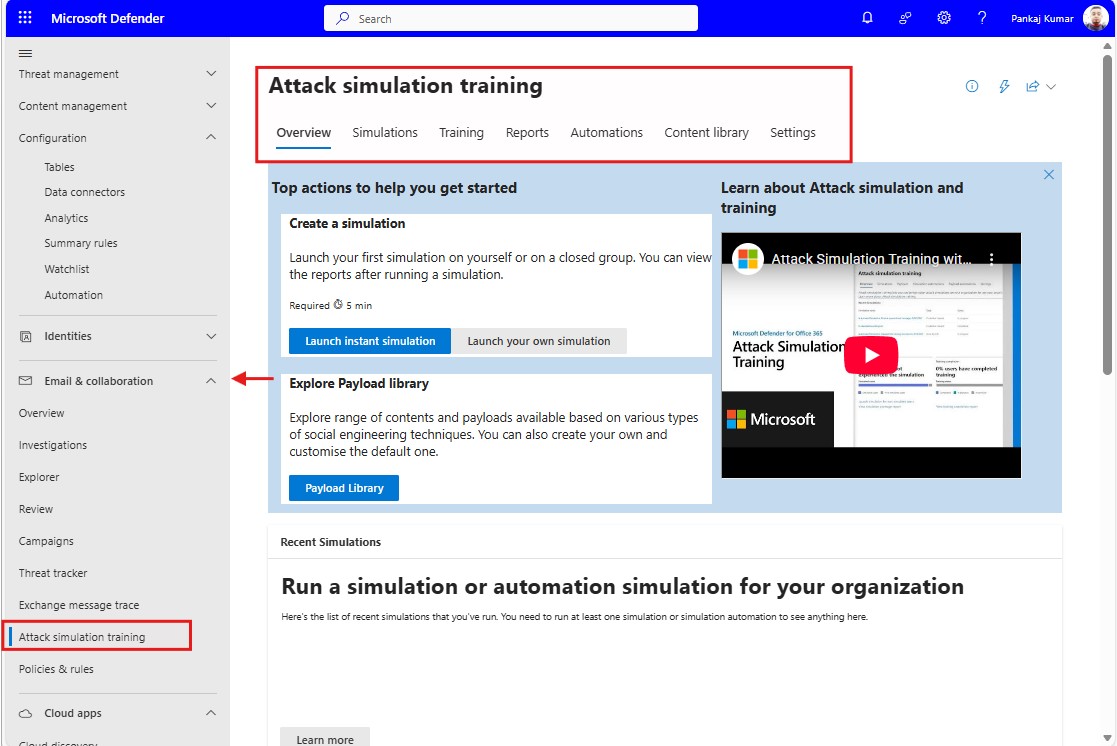
Login to the Microsoft Defender portal:
Email & collaboration > Attack simulation training
Direct path: https://security.microsoft.com/attacksimulator
Important prerequisites checklist
Before launching a campaign, confirm these basics:
- The correct license is assigned.
- The correct role is assigned.
- You have access to the Microsoft Defender portal.
- Audit logging is enabled if you want proper activity visibility and reliable reporting. Several practical setup guides highlight this as an important requirement before expecting meaningful results.
- You understand of the behavior you are attempting to test as well as your target Department/Users.
Step-by-Step Guide: How to Create and Assign Microsoft Attack Simulation Training to Users
Creating and assigning phishing simulation training in Microsoft 365 is crucial for improving your team’s security awareness. Here’s a simple and quick guide to get you started:
1. Access Microsoft 365 Defender Portal
Log in to the Microsoft 365 Admin Center, and open the Microsoft 365 Defender portal.
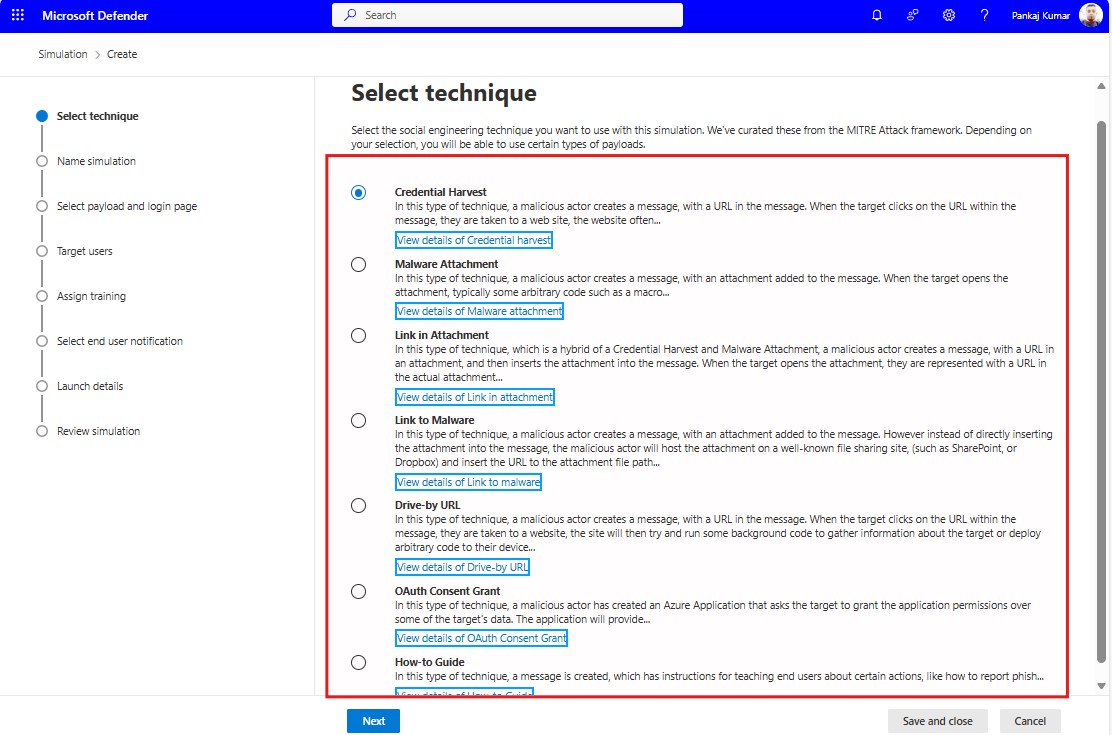
2. Create a Phishing Simulation
Navigate to Attack simulation training > Create simulation. Choose from available phishing scenarios or customize your own.
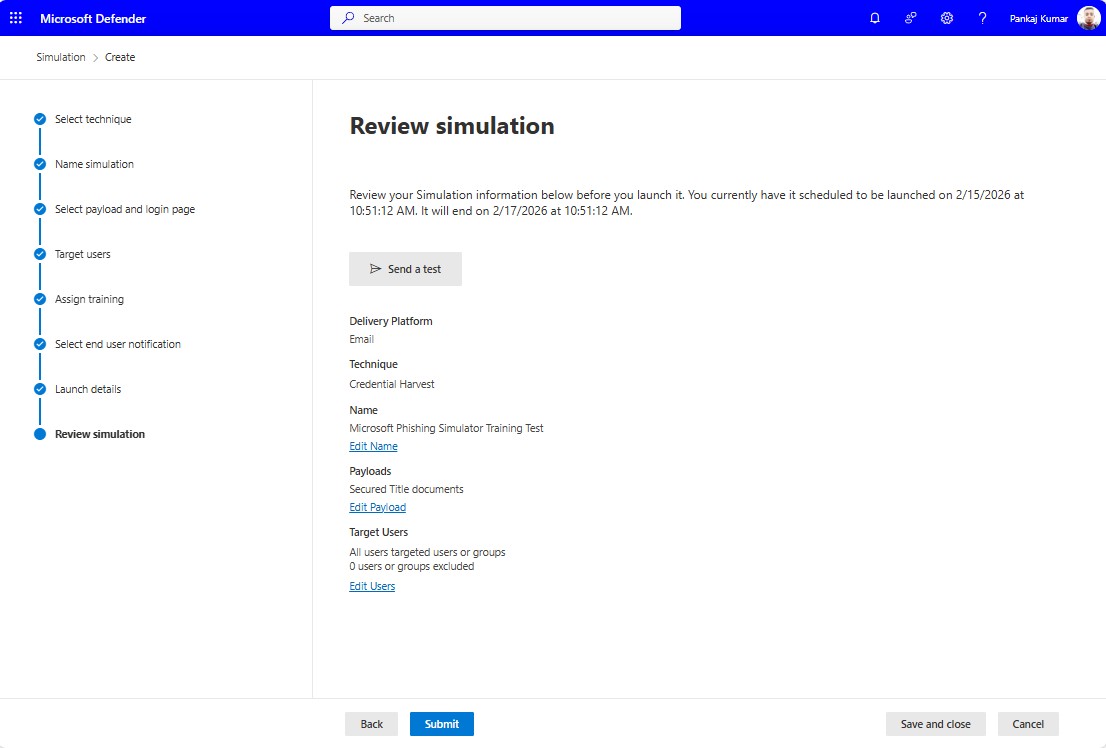
3. Run the Simulation
Launch the simulation by selecting your target users, then monitor the responses to identify vulnerabilities.
4. Set Up Security Awareness Training
For users who fall for the simulation, create a training campaign. Choose training modules and schedule them for completion.
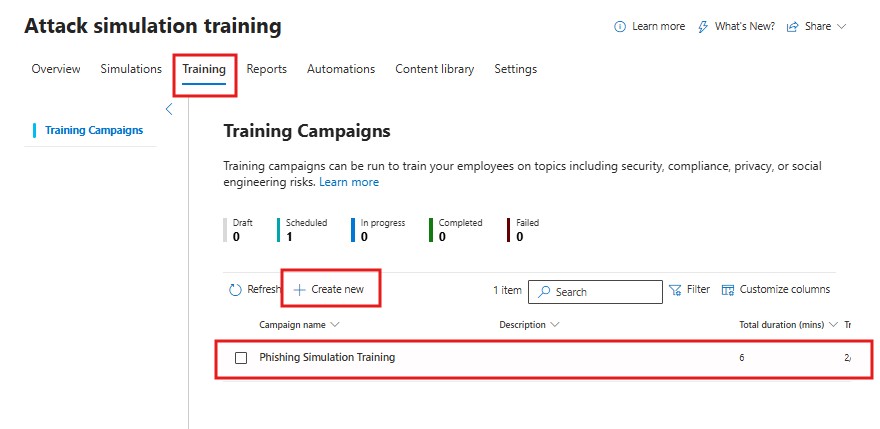
5. Assign Training to Users
Select users who need training based on simulation results, and assign the training. Notifications will be sent to them for completion.
Demo: Phishing Email Notification
When you assign run the Phishing Campaign user will receive Phishing email like below
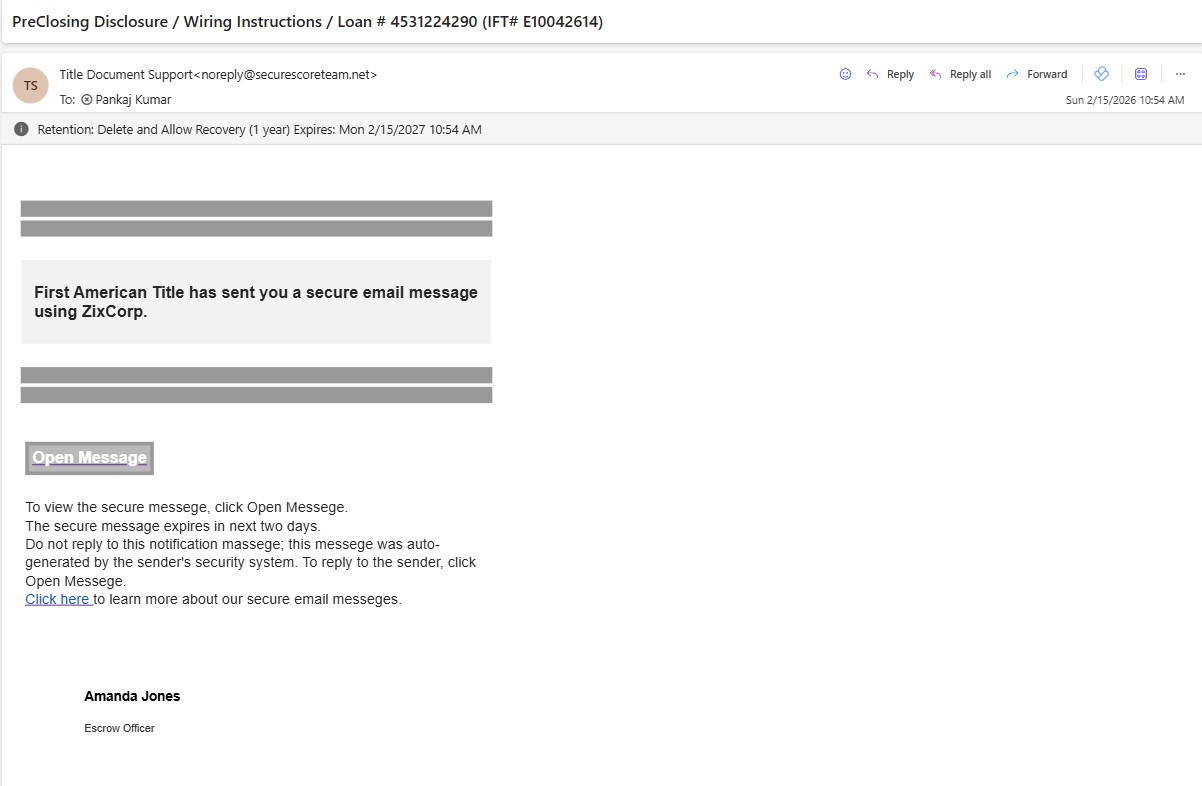 When you open and click on any link on the email it will count the click and Admin can see all of these information in the Report.
Demo: Training Email Notification
When you assign the Training all the recipients will receive the email of training and they need to watch the tutorial and based on that they need to Give the answers.
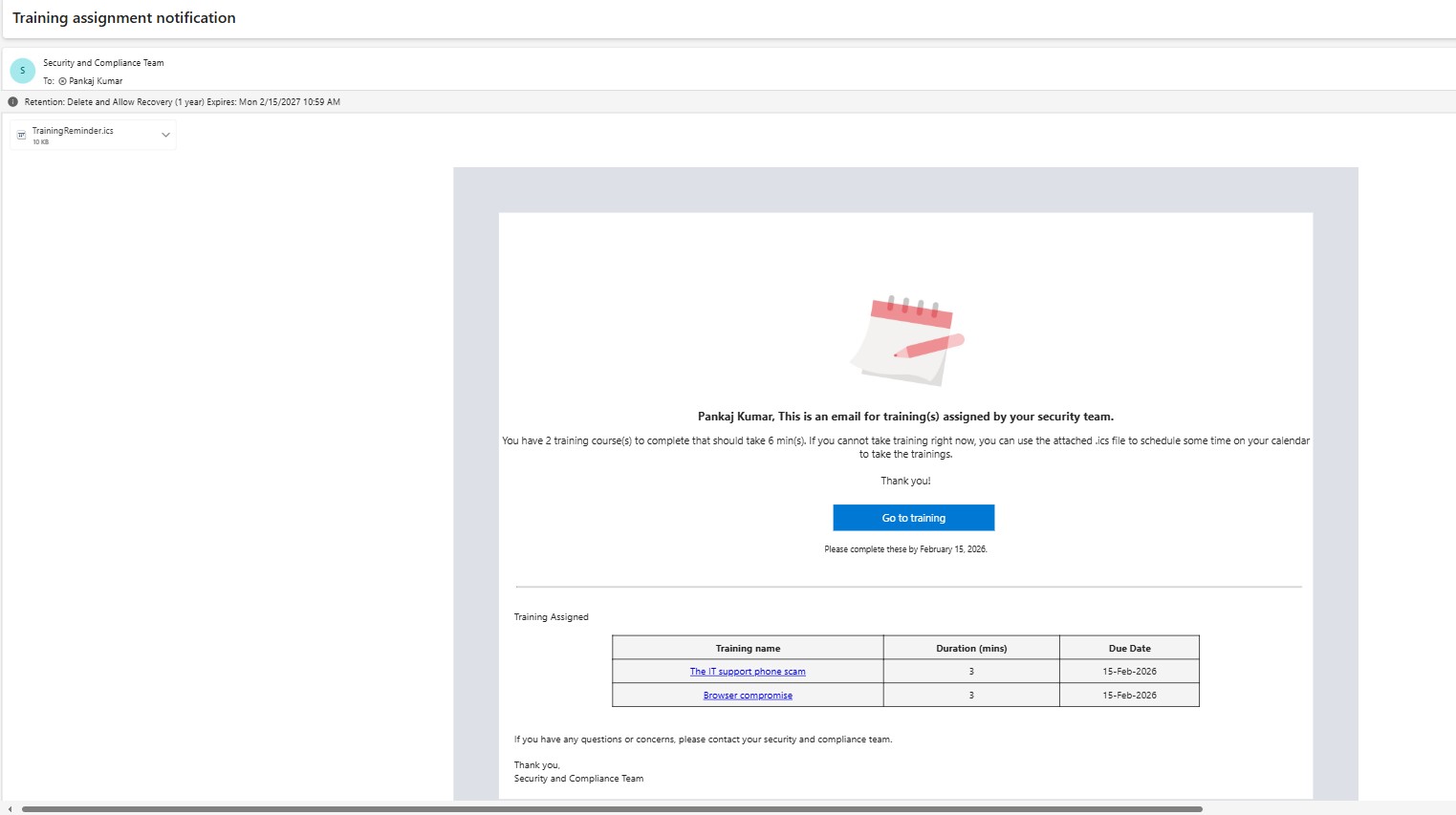
Admins can track the progress and users’ Correct answers.
6. Monitor Progress
Track the progress of training completion and performance to ensure users are improving their awareness.
Regularly running these simulations and assigning corresponding training helps create a more secure and aware workforce, reducing the risk of phishing attacks.
If you are looking for a brief, step-by-step guide on how to create and manage Microsoft phishing simulation training, please refer to this guide.
How to Evaluate Results and Refine New Campaigns
Launching a simulation is easy. Measuring the right outcomes is where the real value appears.
Metrics worth tracking
Focus on metrics that tell you whether your awareness program is improving:
- Click rate
- Credential submission rate
- Report rate
- Training completion rate
- Repeat user behavior over time
- Department or geography trends
What good reporting looks like
A useful reporting process answers questions like:
- Which departments are most likely to click?
- Are users reporting the phishing email through the expected workflow?
- Are repeat offenders improving after training?
- Which simulation techniques lead to the highest engagement?
- Are your current training modules actually reducing risk?
Real-world example
If a finance team shows a much higher click rate on simulated invoice messages than on generic credential lures, that tells you something practical: your next simulation and your next awareness training should reflect the risk patterns that are actually working against that group.
Microsoft Native Simulations vs Third-Party Phishing Platforms
|
Option |
Best for |
Strengths |
Limitations |
|
Microsoft Attack Simulation Training |
Organizations already invested in Microsoft 365 security |
Native integration with Microsoft Defender, built-in awareness workflow, central security visibility, Microsoft-supported simulation flow |
Feature availability depends on licensing, and some teams may want deeper customization or broader cross-platform content libraries |
|
Third-party phishing platforms |
Teams needing broader vendor-neutral training, advanced templates, or cross-platform awareness programs |
Often strong in template variety, long-form awareness content, and simulation customization |
Additional cost, extra platform administration, and less native integration with Microsoft Defender controls |
Which should you choose?
If your organization already uses Microsoft Defender for Office 365 Plan 2 or Microsoft 365 E5, Microsoft’s native Attack Simulation Training is usually the right place to start because it is already aligned with your Microsoft 365 security stack. If your organization later needs more extensive awareness content or non-Microsoft platform coverage, then evaluating third-party tools (Knowbe4) can make sense.
Best Practices for Using a Microsoft Attack simulation training
1.Simulate Regular Attacks
Phishing tactics are constantly evolving, and cybercriminals often change their methods. It’s important to regularly run phishing simulations to expose employees to new threats and reinforce their learning.
Why It’s Important:
- Keeps Employees Alert: Regular simulations ensure that employees stay vigilant and continue to recognize phishing attempts.
- Adapt to New Tactics: As phishing attacks become more sophisticated, running diverse simulations will ensure that employees can handle a variety of phishing scenarios.
2. Create a Safe Learning Environment
Simulated phishing attacks can be an eye-opening experience for employees, especially those who may not be aware of how often phishing occurs. It’s important to create a supportive, non-punitive environment where employees feel comfortable learning from their mistakes.
Why It’s Important:
- Encourages Participation: A non-threatening environment ensures that employees engage fully with the training and simulations.
- Builds Confidence: By providing immediate feedback and education, employees feel empowered to report suspicious emails confidently.
3. Combine with Broader Security Awareness Training
While phishing simulations are a critical tool for improving employee awareness, they should be part of a broader security awareness program. Complement phishing simulations with training on other security topics such as password management, data protection, and secure browsing practices.
Why It’s Important:
- Holistic Security Culture: By covering multiple areas of cybersecurity, you help create a culture of security awareness across the organization.
- More Effective Training: A well-rounded approach to security training ensures that employees are fully prepared to handle a variety of threats, not just phishing.
Conclusion
Microsoft Attack Simulation Training is one of the most practical ways to test whether your organization is truly ready for phishing, not just whether your technical controls look good on paper.
The strongest security programs do not rely only on filters, policies, and awareness slides. They also measure how users respond in realistic situations, identify weak points early, and improve behavior over time. That is exactly what Attack Simulation Training is designed to help you do.
If your organization already uses Microsoft Defender for Office 365, this feature is worth using properly. Start with licensing and role checks, pilot a realistic simulation, measure outcomes beyond just clicks, and use the results to improve both awareness and reporting.
That is how phishing simulation goes from being a checkbox exercise to becoming a real part of your Microsoft 365 security strategy.
FAQs
- What is a Microsoft Attack simulation training?
It’s a tool that simulates phishing attacks within the Microsoft 365 environment to help train employees and improve organizational security. - Why should I use a phishing simulator for Microsoft 365?
It helps raise awareness, test employee responses to phishing attempts, and improve your organization’s security posture. - How often should phishing simulations be run?
Regularly running simulations—at least quarterly—ensures that employees stay vigilant and aware of evolving phishing tactics. - Can Microsoft phishing simulations be customized?
Yes, phishing simulations can be customized to mimic different types of attacks and focus on specific training goals. - Do phishing simulations affect employee morale?
When done correctly and in a supportive environment, phishing simulations are a learning tool that boosts security awareness without negatively affecting morale.
Explore More from MS Cloud Explorers
- Microsoft Zero Trust Assessment Tool: Complete Step-by-Step Guide for IT Admins (2026)
- Microsoft 365 Data Protection: The Ultimate Guide to Secure Your Cloud Data
- Microsoft Insider Risk Management: A Complete Guide to Prevent Insider Threats
- How to Create and Assign Microsoft Phishing Simulator Training in Microsoft 365
- Microsoft 365 Applications Explained: A Complete Guide for IT Admins
- Step-by-Step Guide to Create and Manage Microsoft 365 Accounts and Groups
- How to Create a New Microsoft 365 Tenant: A Step-by-Step Guide
Enjoyed the article?
We’d love to hear your thoughts—share your comments below!
For more insights, guides, and updates from the Microsoft ecosystem, be sure to subscribe to our newsletter and follow us on LinkedIn. Stay connected and never miss out on the latest tips and news!
2 comments on “How to Create and Manage Microsoft Attack simulation training in Microsoft 365 (2026)”