

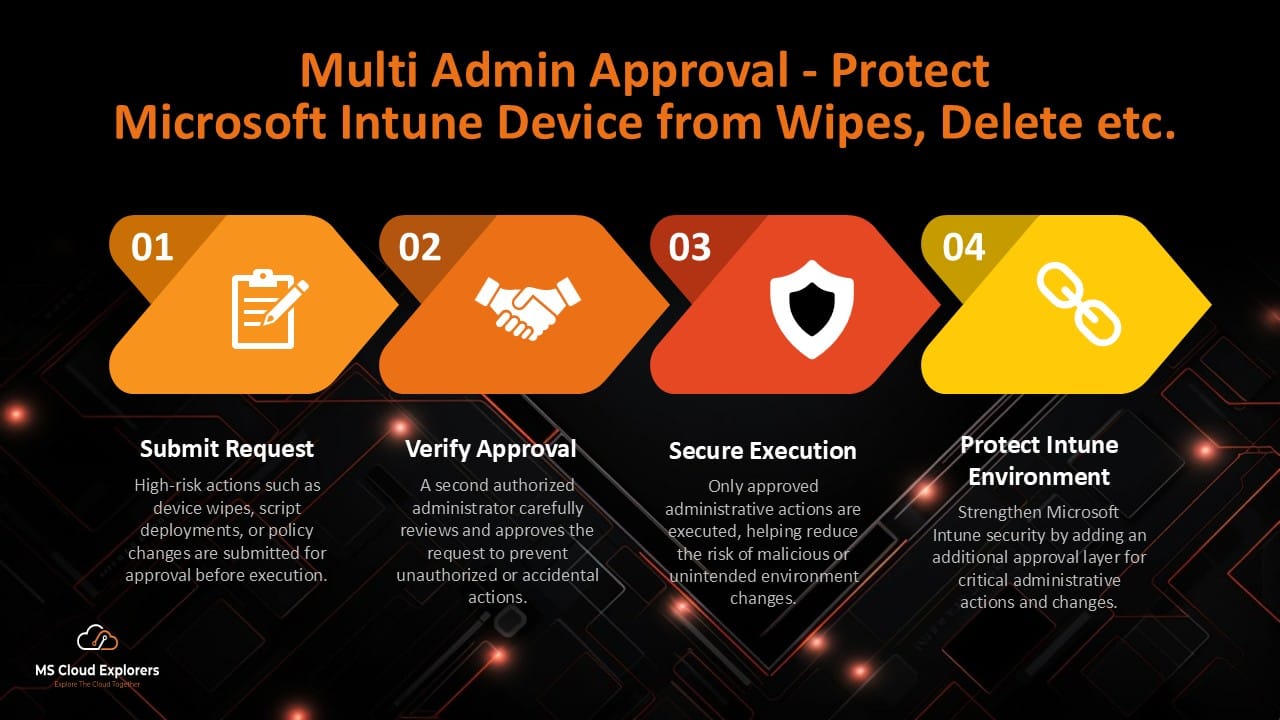
On March 11, 2026, employees at Stryker arrived at work to find thousands of company devices completely wiped. Within just a few hours, nearly 80,000 devices across multiple countries were erased using Microsoft Intune’s remote wipe feature.
This was not ransomware or malware. Instead, attackers reportedly compromised a single administrator account and used Microsoft Intune to perform large-scale device wipes across the organization.
The incident highlighted a serious security risk in many Microsoft 365 environments: a single compromised admin account can cause massive operational damage if there are no additional approval controls in place.
This is where Multi Admin Approval becomes extremely important.
In this article, we’ll explain how Multi Admin Approval in Microsoft Intune works, why organizations should enable it, and how it helps protect against unauthorized or accidental high-risk administrative actions.
What is Multi Admin Approval in Microsoft Intune?
Multi Admin Approval (MAA) is a security feature in Microsoft Intune that requires a second administrator to approve sensitive administrative actions before they can be executed.
Instead of allowing one admin to immediately perform high-impact actions, Intune adds an additional approval step for better security and accountability.
With Multi Admin Approval, organizations can reduce the risk of:
- Unauthorized device wipes
- Accidental configuration changes
- Malicious script deployments
- Privilege misuse
- Compromised admin accounts
This additional layer of approval helps prevent a single account from making destructive changes across the entire environment.
Why a Single Intune Admin Account is Dangerous
By default, a privileged Intune administrator can perform powerful actions such as:
- Remotely wiping devices
- Retiring corporate devices
- Deploying scripts and applications
- Modifying compliance policies
- Changing RBAC permissions
- Updating security configurations
While these features are necessary for device management, they can also become dangerous if an administrator account is compromised.
In many organizations, especially Managed Service Providers (MSPs), admin accounts often have access to multiple customer environments. Without proper controls, one compromised account can impact thousands of devices within minutes.
The Stryker incident showed how quickly this type of attack can disrupt business operations, manufacturing, and even healthcare services.
How Multi Admin Approval Protects Organizations
In Microsoft Intune, Multi Admin Approval provides a two-step approval procedure for high-risk tasks.
Here’s how the process works:
Step 1: Admin Submits a Request
An administrator initiates a sensitive action such as:
- Device wipe
- Device retire
- Script deployment
- RBAC modification
- Policy changes
Instead of executing immediately, the request enters a pending approval state.

Step 2: Another Admin Approves the Request
A separate authorized approver must review and approve the request before Intune allows the action to proceed.
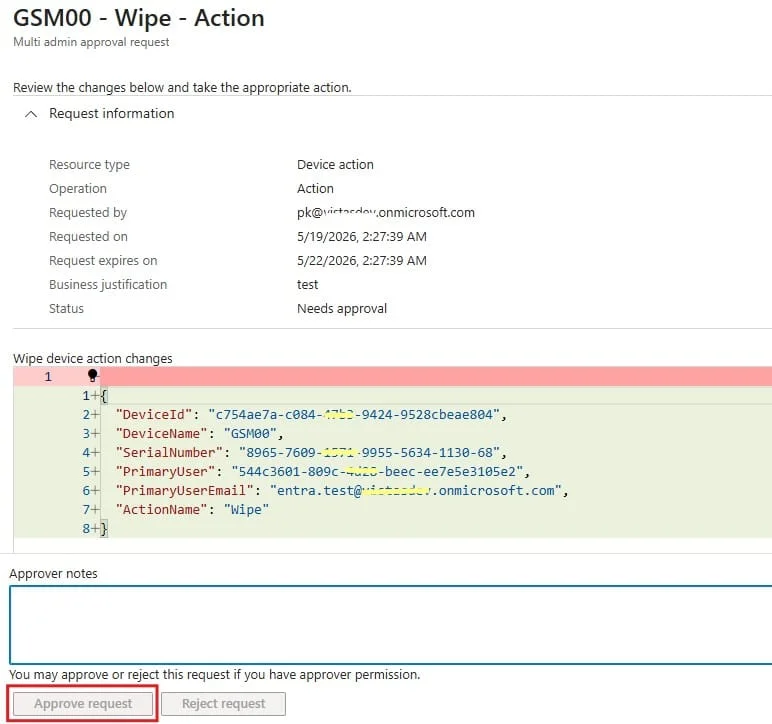
This creates an important security checkpoint and significantly reduces the risk of:
- Accidental changes
- Insider threats
- Compromised admin accounts
- Unauthorized administrative actions
Actions Protected by Multi Admin Approval
Microsoft Intune currently supports Multi Admin Approval for several sensitive actions, including:
- Device wipe and retire actions
- Device deletion
- Script deployments
- App assignments
- RBAC role modifications
- Compliance policy changes
- Configuration policy changes
- Administrative actions triggered through Microsoft Graph API
Organizations should enable approvals for all high-risk administrative actions whenever possible.
How to Configure Multi Admin Approval in Intune
Setting up Multi Admin Approval in Microsoft Intune is straightforward.
1. Create an Approver Group
Create a dedicated Microsoft Entra ID security group for approval administrators.
Best practice recommendations:
- Use dedicated admin accounts
- Require MFA
- Avoid using shared accounts
- Limit membership to trusted personnel only
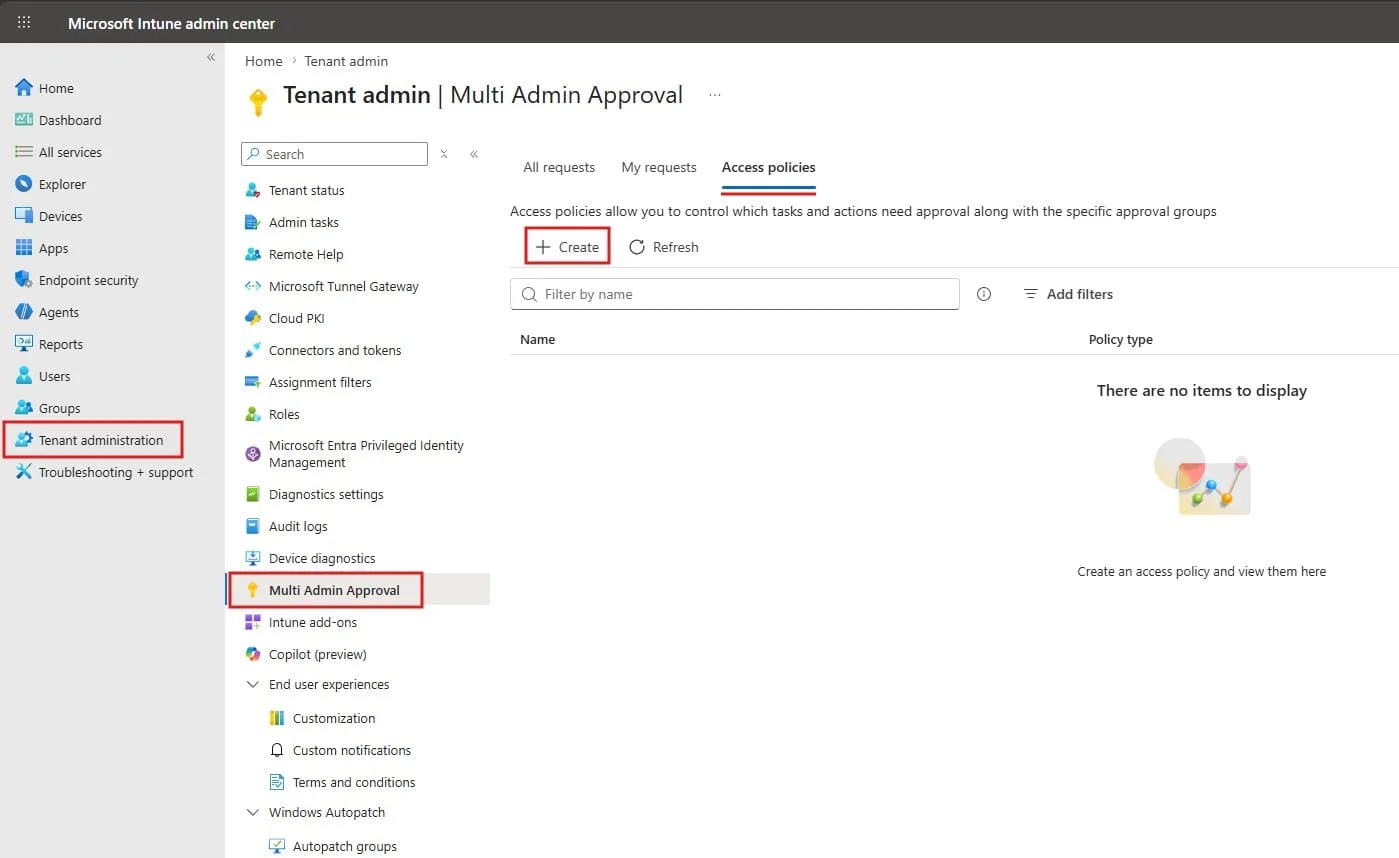
2. Open Multi Admin Approval Settings
In the Microsoft Intune Admin Center:
- Go to Tenant Administration
- Select Multi Admin Approval
- Under the Access Policies, Create new Policy.
3. Create Approval Policies
Configure approval policies for sensitive actions such as:
- Create new Policy with Better Name
- Policy Type
- Remote device wipes
- Script execution
- Policy changes
- RBAC updates

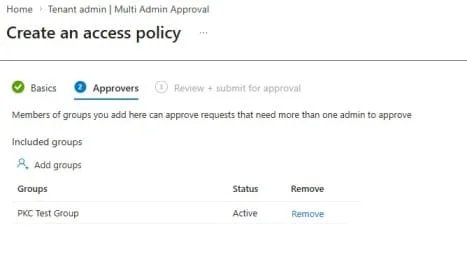
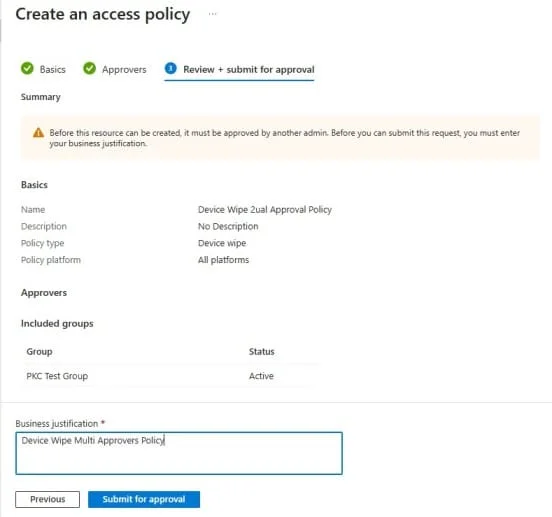
You can customize which actions require approval based on your organization’s security requirements. I’m using here Device wipe for demo purpose.
- Add the Approvers Group who will approve these device actions
4. Review the Approval Workflow
Before enabling in production:
- Review the approval Policy and submit the Approval.
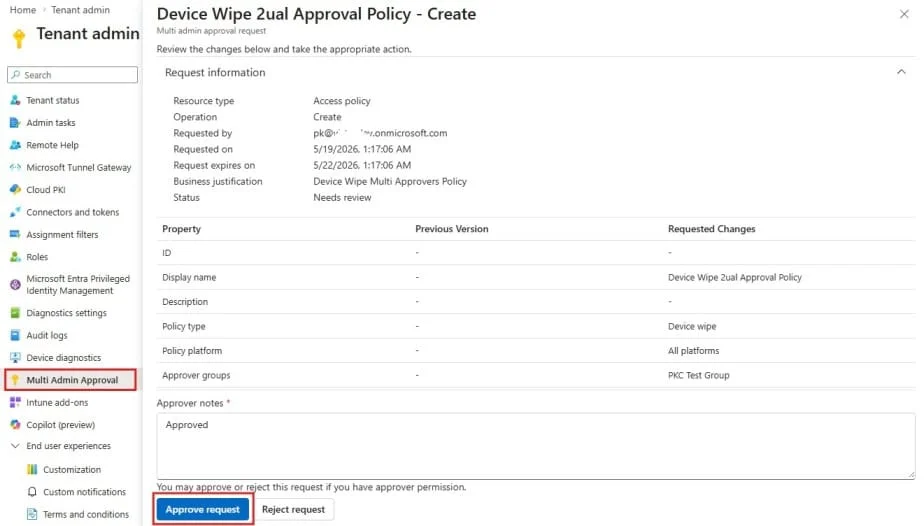
- Ask the Other Intune or Global Admin to Review the Access Policy Request and Approve the Request.
- Intune Admin > Tenant Administration > Multi Admin Approval.
- Review the Policy and Approve Request.
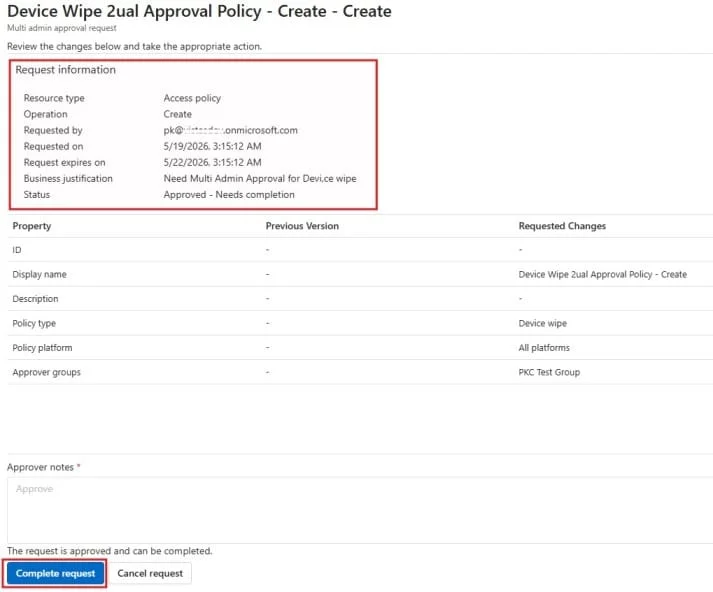
- Please note that Once the Approver Approve the request, Requester also completes the request from their end to complete the task.
- Validate audit logging
- Testing verify that a process works as expected during actual incidents.
Limitations of Multi Admin Approval
Although Multi Admin Approval greatly improves security, organizations should understand its current limitations.
GDAP Delegated Access
Some delegated administrative access methods, such as GDAP used by MSPs, may bypass certain approval protections.
As a result, MSPs should properly monitor their own tenants using:
- MFA
- Conditional Access
- Privileged Identity Management (PIM)
- Least privilege access
Global Administrator Risks
A compromised Global Administrator account may still create or modify approver groups.
For this reason, organizations should strongly secure Global Administrator accounts using:
- Hardware MFA
- Conditional Access
- PIM
- Dedicated admin workstations
Limited Native Notifications
Microsoft Intune currently provides limited native alerting for approval events.
Organizations often improve visibility by integrating:
- Microsoft Teams notifications
- Logic Apps
- SIEM platforms
- Microsoft Sentinel alerts
Additional Security Best Practices
Use Privileged Identity Management (PIM)
Microsoft Entra Privileged Identity Management helps organizations reduce standing administrative access.
Benefits include:
- Just-in-time admin access
- Approval-based elevation
- MFA enforcement
- Reduced attack surface
PIM works very well alongside Multi Admin Approval. Explore our guide to Microsoft Entra Privileged Identity Management (PIM) best practices
Secure Break Glass Accounts
Break glass accounts should:
- Be cloud-only accounts
- Use strong passwords
- Be monitored continuously
- Be excluded only when necessary
- Be used for emergencies only
These accounts should never be used for daily administration. Check out the Step-by-Step guide on Break-Glass account with Notification on Login without Azure Subscription.
Monitor Intune Admin Activity
Organizations should regularly review:
- Intune audit logs
- Microsoft 365 audit logs
- RBAC changes
- Approval requests
- Failed sign-ins
- Privileged role assignments
Continuous monitoring helps detect suspicious activity early.
Who Should Enable Multi Admin Approval?
Multi Admin Approval is highly recommended for:
- Enterprises using Microsoft Intune
- Healthcare organizations
- Government agencies
- Educational institutions
- Managed Service Providers (MSPs)
- Organizations managing remote devices
- Companies with large Microsoft 365 environments
Any organization managing corporate devices through Intune should strongly consider enabling this feature.
Why Multi Admin Approval is Important for Microsoft 365 Security
Modern cyberattacks increasingly target privileged administrator accounts instead of endpoints.
Attackers know that compromising one admin account can provide access to:
- Thousands of devices
- Sensitive company data
- Security configurations
- Identity systems
Multi Admin Approval adds an important security barrier that helps stop attackers from immediately executing destructive actions.
While it is not a complete security solution by itself, it significantly improves protection when combined with:
- MFA
- PIM
- Conditional Access
- RBAC
- Security monitoring
Read our detailed guide on Conditional Access Policies.
Explore our Privileged Identity Management (PIM) best practices guide.
Conclusion
The 2026 Stryker incident demonstrated how dangerous a single compromised administrator account can be in a Microsoft Intune environment.
By enabling Multi Admin Approval, organizations can add a critical security checkpoint for high-risk administrative actions such as device wipes, script deployments, and policy changes.
Combined with strong identity protection, privileged access management, and continuous monitoring, Multi Admin Approval helps organizations strengthen Microsoft 365 security and reduce the risk of large-scale operational disruption.
FAQs
- What is Multi Admin Approval in Microsoft Intune?
Multi Admin Approval is a Microsoft Intune security feature that requires another administrator to approve sensitive actions before execution. - How does Multi Admin Approval help prevent mass device wipes?
It prevents a single administrator account from immediately performing high-risk actions like remote device wipes without secondary approval. - Does Multi Admin Approval work with Microsoft Graph API actions?
Yes, certain Microsoft Graph administrative actions can also require approval. - Can MSP delegated access bypass Multi Admin Approval?
Some GDAP delegated access scenarios may bypass approval protections, so MSP security remains extremely important. - What are the best security practices alongside Multi Admin Approval?
Organizations should also implement:- MFA
- PIM
- Conditional Access
- RBAC
- Audit monitoring
- Break glass governance
Explore More from MS Cloud Explorers:-
- Microsoft 365 Breakglass Account: A Complete Guide
- How to Recover a Hacked Microsoft 365 Account
- How to Set Up Single Sign-On (SSO) for Dialpad with Azure AD
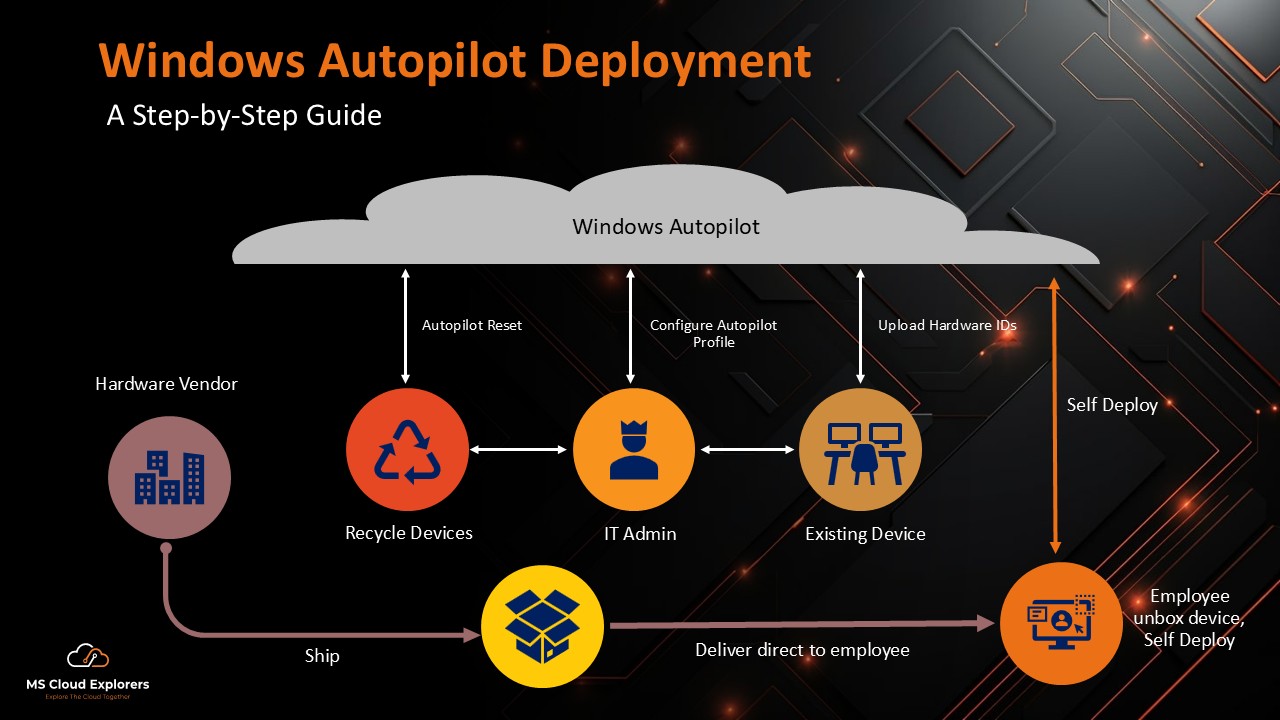
- Step-by-Step Guide for Windows Devices Enrollment in Microsoft Intune
- Effortlessly Deploy the ChatGPT and Microsoft Store Apps with Microsoft Intune
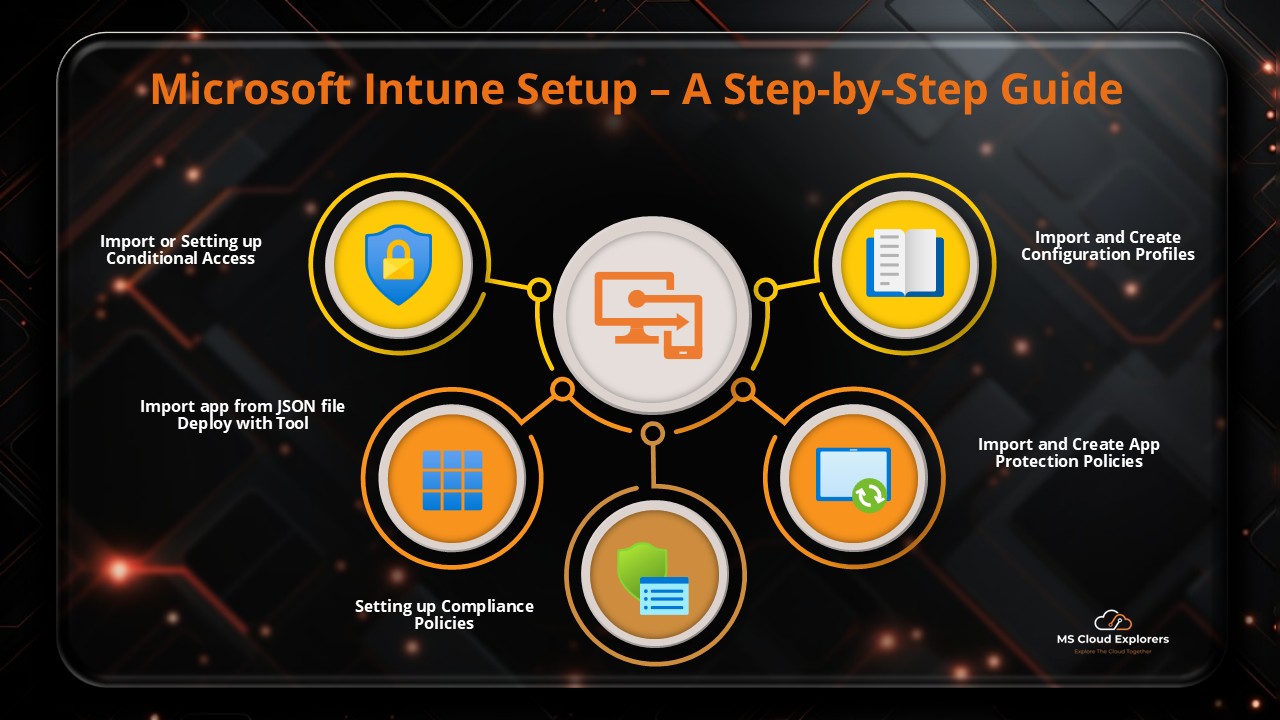
- How to Setup Microsoft Intune with Pre-Build templates (Zero to Hero)
- Microsoft Endpoint Manager (Intune): Comprehensive Beginner’s Guide
Enjoyed the article?
We’d love to hear your thoughts—share your comments below!
For more insights, guides, and updates from the Microsoft ecosystem, be sure to subscribe to our newsletter and follow us on LinkedIn. Stay connected and never miss out on the latest tips and news!
2 comments on “How Multi Admin Approval Helps Prevent Large-Scale Device Wipes in Microsoft Intune 2026”